©2026 Chipp Walters, Altuit, Inc.
The #1 frustration with full-color laser-cut crafts: the cut never lines up perfectly.
What about a desktop app that creates a printable image with extra bleed (color around the edges) and a matching SVG cut path, so small alignment errors do not leave white gaps or exposed material.
Print the color-extended version. Cut the original shape. Get cleaner full-color laser-cut crafts.
Why this happens
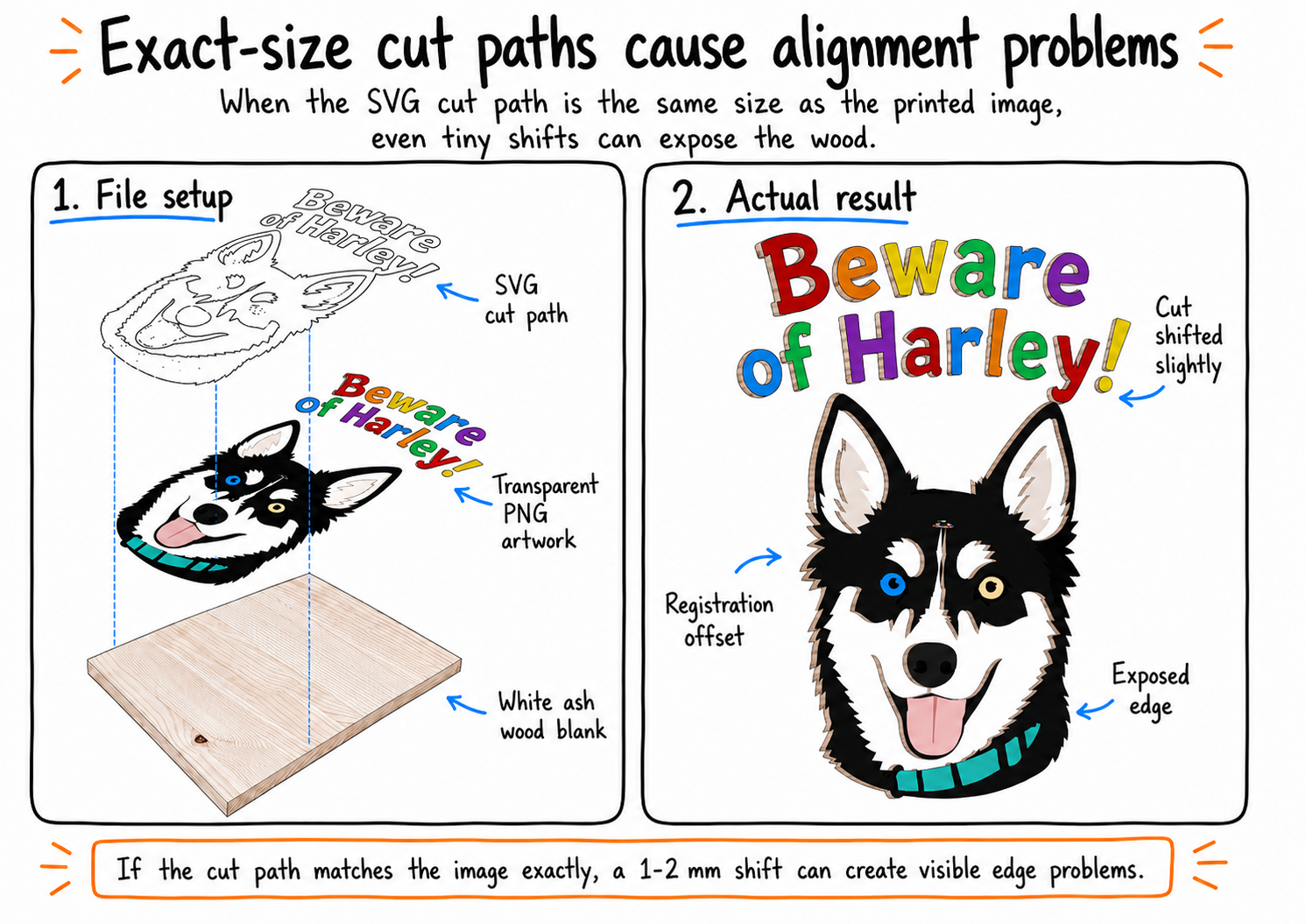
When your print image and SVG cut path are exactly the same size, even a tiny registration shift can expose the material underneath. That is why full-color laser-cut crafts often end up with white gaps, raw wood edges, or uneven borders.
How Mocha Bleed & Cut fixes it
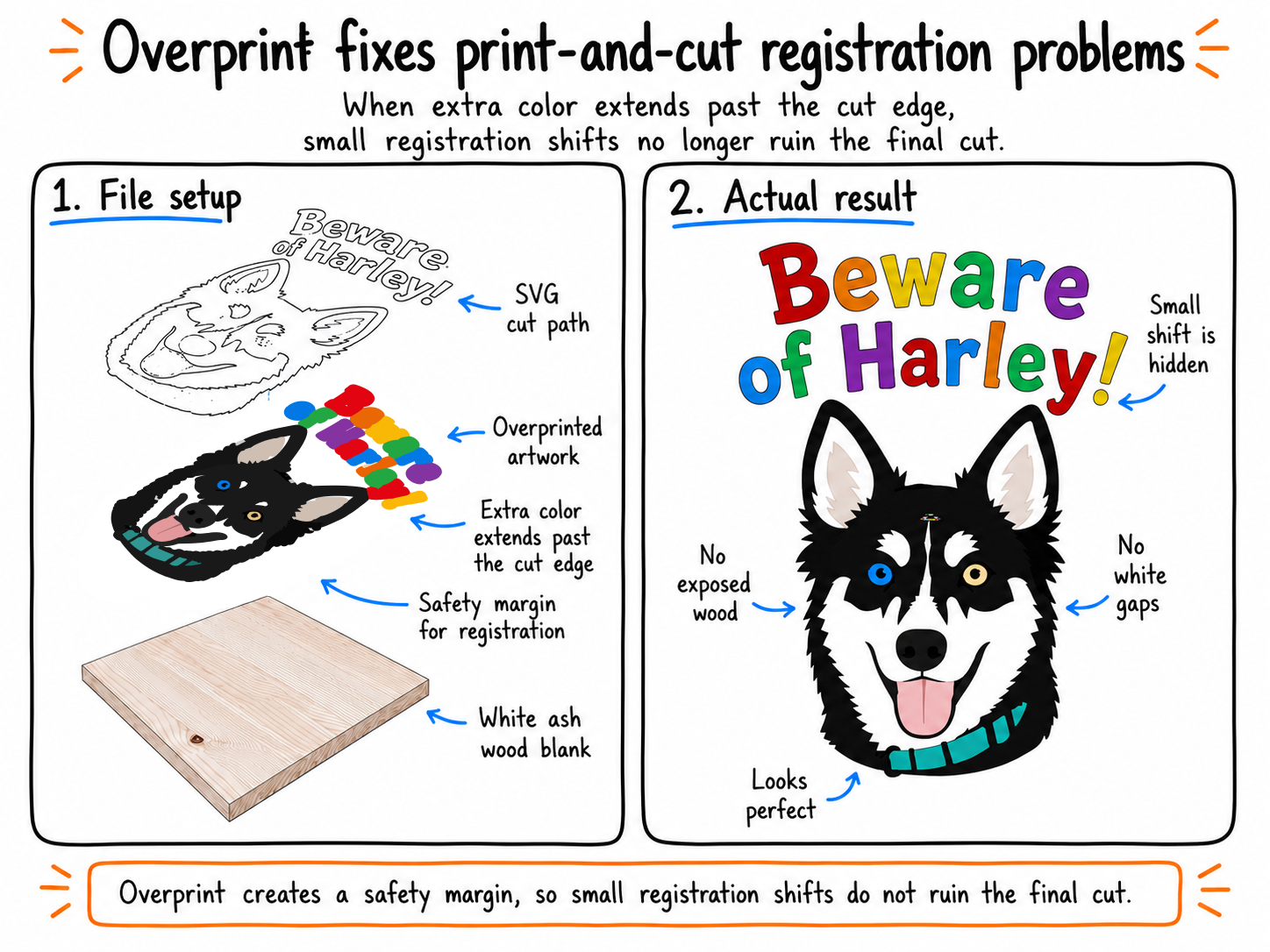
Mocha Trace extends the artwork slightly beyond the cut line, creating a color safety margin. The SVG cut path still follows the original shape, but the printed color now continues past the edge, so small alignment errors are hidden instead of ruining the piece.
What Is Mocha Trace?
Mocha Trace is a standalone Windows app for converting raster images into clean SVG files.
It is built for makers, designers, and craft businesses who need to turn artwork, logos, AI-generated images, and digital designs into usable production files without jumping between multiple design apps.
At its core, Mocha Trace efficiently converts images into SVG outlines and cut paths. But it goes further than simple tracing. Built into Mocha Trace is the Mocha Bleed & Cut workflow — a maker-focused process that creates a printable image with extra color around the edges and a matching SVG cut path from the same artwork.
That means you can prepare full-color laser-cut crafts, signs, ornaments, tags, badges, product cutouts, and other printed craft pieces in one focused app.
Instead of using one tool to remove the background, another to resize, another to upscale, another to trace, another to create edge coverage, and another to prepare the final print-and-cut files, Mocha Trace brings the essential workflow together.
Convert the image. Create the print file. Generate the cut path. Finish the craft.
From AI Artwork to Print-Ready Craft Files — All in One App
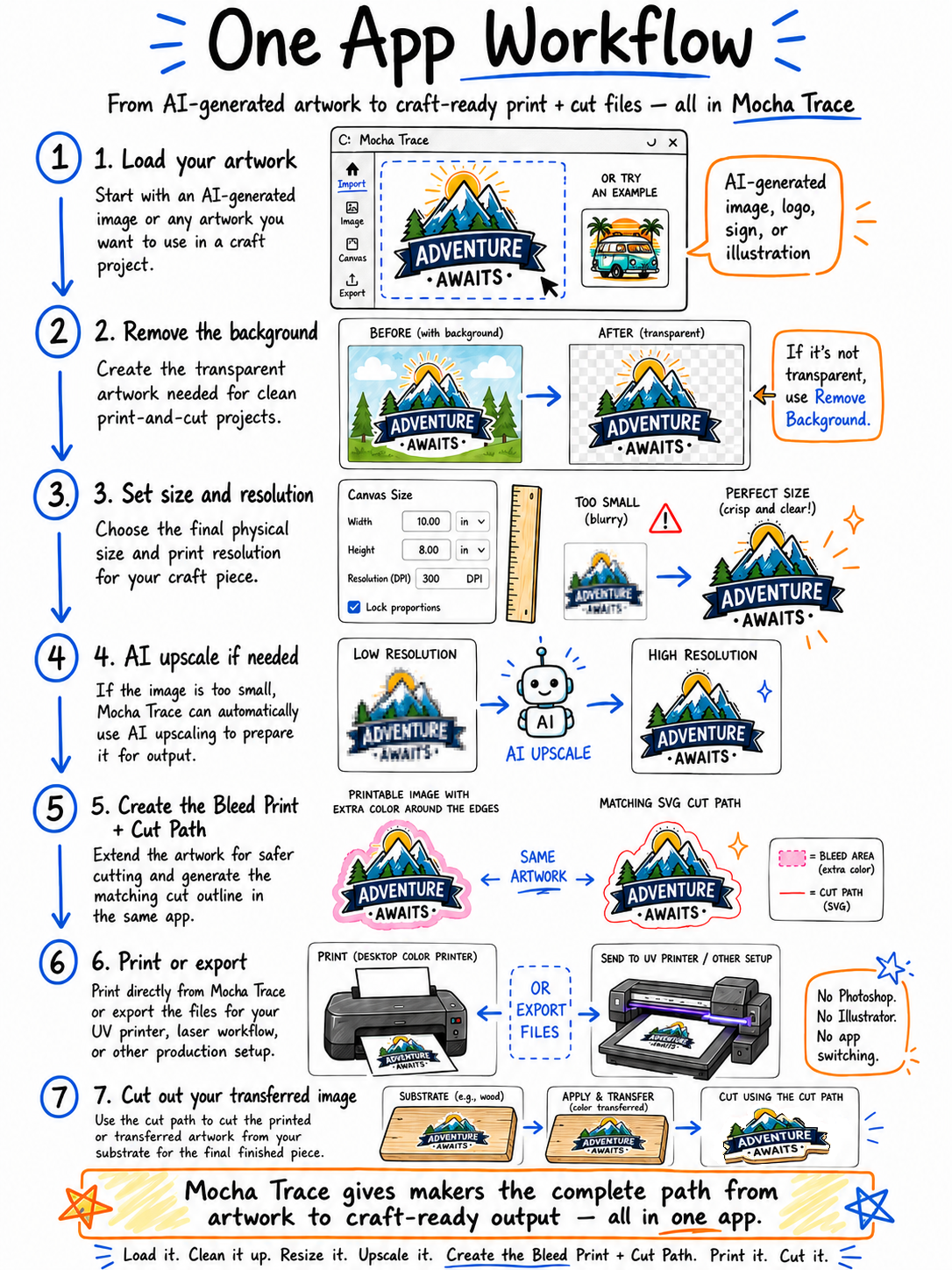
Mocha Trace is designed for makers who are using AI-generated artwork, digital designs, logos, signs, and illustrations in real-world craft projects. Instead of jumping between Photoshop, Illustrator, Inkscape, and separate print tools, Mocha Trace brings the full prep workflow into one focused desktop app.
1. Load Your Artwork
Start with an AI-generated image, a logo, a sign design, or any other image you want to turn into a full-color laser-cut craft.
If your artwork already has transparency, you can begin right away. If it does not, use Mocha Trace’s background removal feature to isolate the design and create the transparent artwork needed for clean print-and-cut projects.
2. Set the Size and Resolution
Choose the final physical size of your craft piece and set the resolution needed for clean printing.
If the image is too small for the size you want to make, Mocha Trace can automatically use AI upscaling to increase the image resolution before output. That means your artwork can be prepared at the right size without having to leave the app or manually upscale it somewhere else.
3. Create the Extra Color Edge
Once the size and resolution are set, Mocha Bleed & Cut creates a printable image with extra color around the edges.
This extra color gives your design a safety margin, so small print-and-cut alignment errors do not leave white gaps, exposed wood, or unfinished edges.
4. Generate the Matching SVG Cut Path
At the same time, Mocha Trace can generate the matching SVG cut path from your artwork.
The printable image gets the extra color coverage, while the SVG cut path follows the intended shape. Together, they give you the two files you need for cleaner full-color laser-cut crafts:
Printable Image + Matching SVG Cut Path
5. Print or Export
When your files are ready, you can print directly from Mocha Trace to your color printer or export the image for your UV printer, laser workflow, or other production setup.
Mocha Trace gives you the complete path from artwork to craft-ready output without switching between multiple design apps just to remove a background, resize, upscale, create extra edge color, trace the outline, and prepare the final files.
Who Is Mocha Trace For?
Mocha Trace is for makers who want to turn digital artwork into real physical products.
It is especially useful for:
Laser Cutter Owners
If you use a laser cutter to make signs, ornaments, tags, plaques, decorations, or product cutouts, Mocha Trace helps you create the SVG cut paths you need from your artwork.
Full-Color Craft Makers
If you print or transfer color artwork onto wood, acrylic, leather, paper, or other materials before cutting, Mocha Bleed & Cut helps prevent white gaps, exposed edges, and registration problems.
AI Artwork Users
If you generate signs, logos, illustrations, mascots, labels, or decorative artwork with AI tools, Mocha Trace helps turn those images into craft-ready production files.
Etsy Sellers and Small-Batch Product Makers
If you sell handmade or custom products, Mocha Trace can help reduce setup time, wasted blanks, and ruined pieces caused by print-and-cut alignment issues.
UV Printer and Transfer Users
If you print directly to materials or export artwork for UV printing, sublimation, DTF, waterslide, or other transfer workflows, Mocha Trace helps prepare the image and matching cut path in one place.
Designers Who Do Not Want to Fight Multiple Apps
If you do not want to bounce between Photoshop, Illustrator, Inkscape, tracing tools, upscalers, and print utilities just to make one craft-ready file set, Mocha Trace gives you a simpler path.
Mocha Trace is for anyone who wants to go from image to SVG, and from artwork to full-color craft-ready output, with fewer steps and fewer alignment headaches.