# Blender Add-on Developer Strategy Document
by Chipp Walters 7/18/2026
## Building My Way Out of a Marketing Problem
I genuinely enjoy creating add-ons for Blender. It is more than a hobby for me—it has also generated a meaningful level of income, or at least it used to.
As sales began to slow, my first instinct was to do what developers naturally do: build more. I thought adding new features to my existing add-ons might increase sales. When that did not work, I thought perhaps I simply needed to create more add-ons and put more products on the market.
Neither approach made much difference.
The problem is that I love creating things, especially tools. Blender is a perfect fit for that instinct because I can create tools in the form of add-ons that both I and other artists can use. It feels productive, creative, and useful—a genuine win-win.
But the marketplace has changed. Economic pressure, increased competition, and an overwhelming amount of noise have made it increasingly difficult for add-on developers to stand out, maintain visibility, and earn a sustainable living. Creating a better product or adding another feature is no longer enough by itself.
That led me back to two pieces of advice someone gave me years ago:
1. **Your best customers are your existing customers.**
2. **Sell what’s in your bag. Do not keep running out to create something new. Sell what you already have.**
That advice feels especially relevant now.
Superhive and Gumroad are introducing support plans, memberships, and other models that can create recurring revenue from existing customers. At the same time, AI makes it possible to automate much of the marketing, documentation, publishing, and promotion that developers have traditionally struggled to maintain.
And importantly, this approach still allows me to do what I enjoy most: create tools.
Instead of putting all of my energy into developing more products or continually adding features in the hope that sales will follow, I have decided to refocus much of that effort on building tools and systems that market the products I already have. These tools can organize product knowledge, generate documentation and landing pages, create media, publish content across multiple platforms, and automate ongoing promotion.
The goal is not to give myself more marketing work. The goal is to engineer the work away.
What follows is an outline of the system I have been developing—a modular, AI-assisted pipeline designed to turn existing products into a continuous marketing engine.
I am keeping my fingers crossed that it makes a meaningful difference. But even if it does not, I have to admit: building these kinds of tools with AI is a tremendous amount of fun.
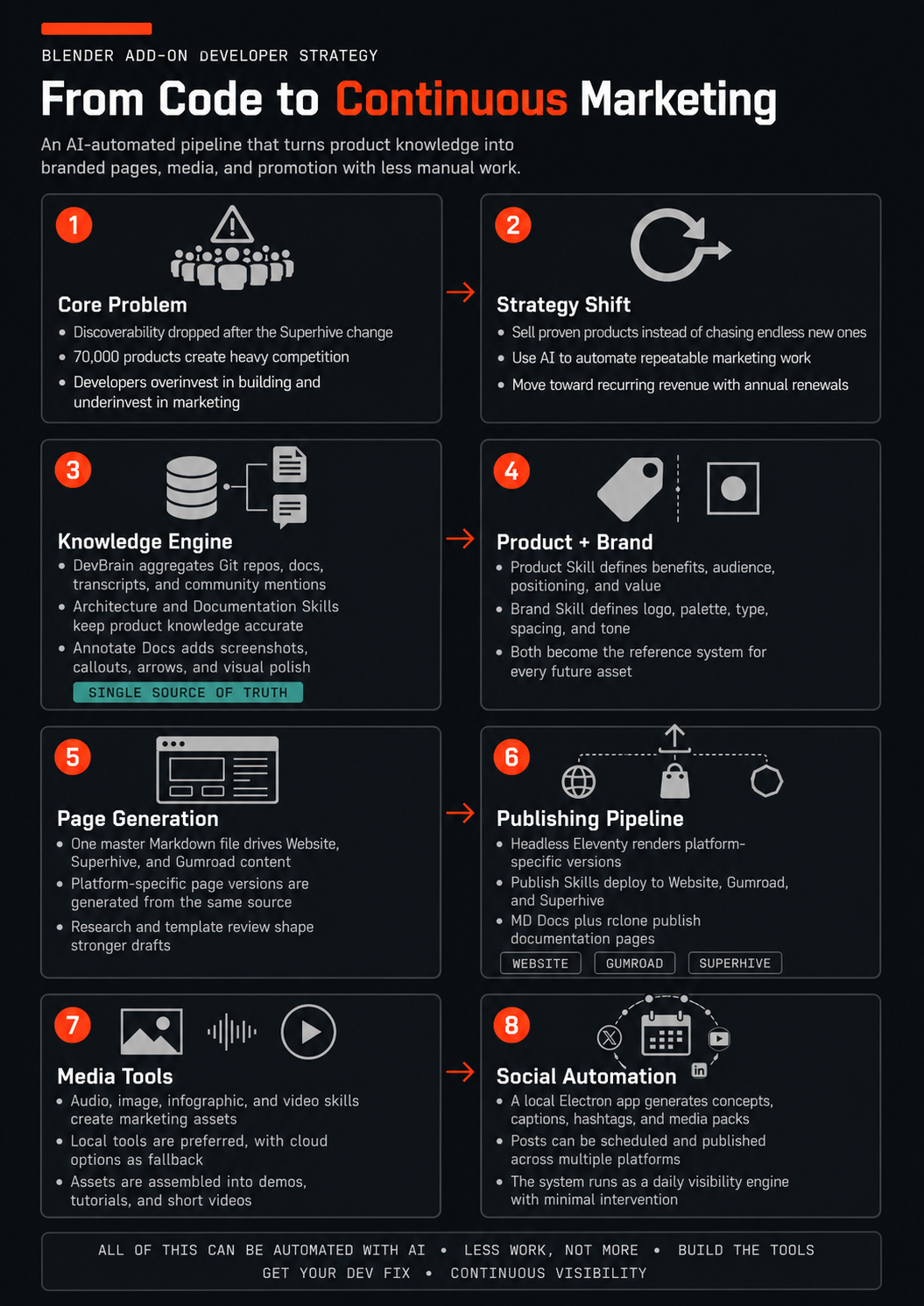
## Core Problem
Superhive (formerly Blender Market) is the primary marketing channel for Blender add-ons, but several factors are causing severe sales downturns:
- Name change from Blender Market to Superhive reduced discoverability.
- Hobbyists (a large portion of the Blender user base) are shifting discretionary income to AI tools instead of add-ons.
- Superhive now hosts 70,000 products, making it extremely difficult for existing developers to gain traction amid heavy competition from low-priced, AI-generated add-ons.
## Foundational Insight
Even the best-developed products fail without strong marketing. Developers typically allocate 70-80% of effort to development and only 20-30% to marketing, but the reality is closer to the reverse: 30% development, 70% marketing. A well-marketed mediocre product outsells a poorly marketed excellent one. The "better mousetrap" myth does not hold—visibility and clear value communication matter more than incremental technical improvements.
## Overall Strategy
- Stop chasing new products. Focus marketing effort on existing, proven products ("sell what's in your bag").
- Leverage name recognition and service reputation as a competitive moat against newcomers.
- Use AI to build automated marketing systems rather than performing marketing manually.
- Shift from one-time sales to recurring revenue via service contracts (initial retail price includes one year of updates and support; renewals at a discounted rate).
- Build a persistent knowledge base and modular AI skills to generate consistent, high-quality marketing assets with minimal ongoing effort.
## Recurring Revenue: Superhive Service Plans and Gumroad Memberships
Superhive now offers **service plans**, which allow developers to generate ongoing revenue from a product rather than a single one-time fee. This matters for a reason every good marketer understands: **your existing customers are your best customers** — the people most likely to buy from you again are the ones who already have. Service plans turn that installed base into a recurring revenue stream instead of a one-and-done transaction.
Gumroad offers **memberships**, which are almost identical in structure and can be mapped very carefully to Superhive's service plans. With careful wording, the two offers can be presented so they look essentially the same to the customer — same benefits, same renewal framing, same value proposition — regardless of which platform they buy on.
The result: the recurring-revenue benefits of **both** platforms from a single, consistently worded offer:
- One service/membership offer, worded once, deployed on both Superhive and Gumroad.
- Initial retail price includes the first year of updates and support; renewals at a discounted rate (per the Overall Strategy).
- Consistent wording across platforms prevents customer confusion and keeps the offer easy to maintain from the single master Markdown source.
## Key Components and Skills
### 1\. /Dev-Brain (LLM Wiki)
A daily daemon that aggregates all product-related information into a structured Obsidian vault following Andrej Karpathy's LLM Wiki pattern.
- Scans local Git repositories for source code and architecture.
- Ingests existing documentation.
- Pulls and processes YouTube video transcripts.
- Searches Reddit, forums, and other online mentions.
- Creates a living, cross-linked Markdown wiki that serves as the single source of truth.
- The AI maintains and updates the wiki automatically; the developer rarely edits it directly.
### 2\. /Architecture Skill
The foundational technical reference.
- Analyzes source code from Git repositories.
- Identifies issues, dependencies, and architectural patterns.
- Provides the AI with an accurate map of how each product works.
- Updated whenever code changes.
### 3\. /Documentation Skill
Generates clean, up-to-date Markdown documentation.
- References the Architecture Skill and DevBrain.
- Pulls from source code and existing docs.
- Produces consistent, professional Markdown output.
### 4\. /Annotate Docs Skill
Enhances documentation with visual elements using the MD Docs tool (which runs via MCP on Linux, Windows, and Mac).
- Automatically captures screenshots of key interfaces (preferences, N-panel, etc.).
- Adds numbered dots, callouts, highlights, and arrows as editable SVG overlays.
- Integrates the annotated images back into the Markdown documentation.
- Produces polished, visual documentation ready for publishing.
### 5\. /Product Skill
Builds marketing messaging and analysis for each product.
- References DevBrain, Architecture Skill, and Documentation Skill.
- Focuses exclusively on marketing aspects: benefits, target audience, positioning, value proposition.
- Includes references to images, infographics, and videos showing the product in action.
- Serves as a living reference file that other AI tools can query directly (e.g., when generating websites or sales copy).
- Provides a starting point for complete market analysis rather than the final version.
### 6\. /Brand Skill
Defines the complete visual identity system for consistent branding across all products and marketing assets.
- Created after an initial interview and design exploration phase.
- Includes: logo (the mark), logotype (the wordmark), color palette, typography, line spacing, and overall look-and-feel.
- Starts with a clean black-and-white logo (with optional single accent color) that can be colorized later.
- The logotype styles the brand name (e.g., all caps or mixed case) and domain separately if applicable.
- Once finalized, any future asset references this skill to maintain visual consistency.
## Branding Workflow
1. Use the Product Skill as reference.
2. Have ChatGPT (or Claude) interview the developer on preferences, liked websites, core messaging, target customers, and desired brand personality.
3. Feed the resulting prompt into a design AI (Claude Design, ChatGPT Image, etc.) to generate initial website and branding concepts.
4. Select the preferred direction.
5. Ask Claude to extract the full system into the /Brand Skill document.
6. Maintain the Brand Skill as the single reference for all future visual assets.
## Publishing Pipeline
- MD Docs renders the final annotated Markdown to a self-contained HTML page with one click, including the images folder.
- Rclone syncs a local desktop folder to a remote server via WebDAV, SFTP, or similar (supports cPanel hosting).
- Files dropped into the local folder automatically appear live on the server.
- Right-click context menu on any file or folder copies its direct public URL to the clipboard for easy sharing in messages or documentation.
## Implementation Notes
- All skills are designed to be modular and reference previous layers for consistency and accuracy.
- The system leverages MCP where possible (e.g., MD Docs integration) for seamless Blender and tool interaction.
- The goal is to engineer repeatable marketing processes that run with minimal developer intervention, allowing focus to remain on development while still achieving strong visibility and recurring revenue.
- This document serves as the master reference; future expansions (website creation, email systems, partnerships, etc.) will build directly on these foundations.
## Multi-Surface Publishing Pipeline
To maximize reach and conversion, we generate and maintain **three different marketing web pages** for each product:
- One for **Gumroad**
- One for **Superhive**
- One for **our own website**
All three are driven from a single master Markdown file (site/.md) as the source of truth. This file contains core content, sections, and platform-specific overrides.
Claude builds and renders the appropriate version for each destination, and deployment scripts handle publishing. This ensures consistent branding and messaging while minimizing duplication. Only Superhive will need you to manually add the iframe content.
## Generating Branded Landing Pages
Once the **/Product Skill** (marketing messaging, value propositions, audience insights) and **Brand Skill** (visual identity, tone, colors, typography, and overall look-and-feel) are established:
**Recommended Process**:
1. Review your existing landing pages and identify the current best-performing one (typically on Gumroad or Superhive) to use as a structural template.
2. Activate a **/Research Skill** to pull relevant customer language, competitor positioning, and market insights. This skill directs Claude to query both Grok and ChatGPT for optimized headlines, benefit statements, descriptions, social proof ideas, and calls-to-action.
3. Provide Claude with the /Product Skill, Brand Skill, research findings, and chosen template. Instruct it to generate **two primary drafts**:
- A full-width version optimized for your own website landing page.
- An iframe-compatible version formatted for Superhive (constrained to approximately 810 pixels wide).
The Superhive iframe draft can also be used directly on Gumroad (Claude has strong integration support for Gumroad and can handle most of the upload/setup directly). For Superhive itself, Claude generates clean HTML that you can paste in.
**Evaluation Tip**: Focus your review on the website and Superhive drafts. These two can (and often should) look quite different due to Superhive’s narrower width constraint and formatting rules. Once approved, the Gumroad version is a straightforward adaptation.
This workflow ensures strong, on-brand messaging across all surfaces with a single coordinated generation step.
## Image Optimization for Landing Pages
Each product maintains its own information folder (created as part of the Product Skill workflow) containing source images and reference documents.
These source images do **not** need to be in final resolution, format, size, or aspect ratio. A new **Optimize Images** skill will automatically:
- Copy the relevant images into the appropriate landing page folders.
- Resize, format, compress, and adjust aspect ratios as needed.
- Ensure the images are clean, consistent, and bandwidth-optimized across the website, Superhive, and Gumroad versions.
This keeps visual assets consistent and production-ready without manual rework for each surface.
## /Publish Skills
To complete the automated workflow, we create dedicated **/Publish Skills** that handle deployment for each surface:
- **Website /Publish Skill**: Moves the generated landing page content into the local clone folder and syncs it via rclone/WebDAV to the live server.
- **Gumroad /Publish Skill**: Uses Claude Code (or Claude’s built-in capabilities) to automatically update the Gumroad product page with the generated content.
- **Superhive /Publish Skill**: Generates the properly sized iframe embed code (with dynamically calculated height), prepares all required keywords/metadata, and handles the upload/paste process for the Superhive product page.
These /publish skills ensure that once the master Markdown is updated and the pages are generated, deployment across all three platforms happens with minimal manual intervention—further reducing effort and maintaining consistency.
## Documentation Publish Skills
We also maintain dedicated skills for publishing documentation and related pages using **MD Docs**:
1. Open the generated Markdown document in MD Docs.
2. Save a copy into the Rclone WebDAV folder.
3. Apply the current Brand Theme (colors, fonts, typography, and layout).
4. Publish the final page.
**MD Docs Theming Recommendation**: Create a custom theme in MD Docs that matches your Brand Skill. This is straightforward—ask Claude to analyze MD Docs, select an existing theme as a base, and generate a new custom theme using your defined colors, fonts, typography, and overall layout. Once created, this theme can be applied consistently to all documentation and landing pages.
## Media Creation Tools
To support rich marketing content (tutorials, demos, social clips, and product videos), we create a set of integrated media skills. Preference is given to local tools for cost efficiency and control, with cloud options (ElevenLabs, etc.) as fallbacks.
### Required Media Skills
1. **/Audio Rendering Skill** Generates reliable, consistent voice narration. Prioritize local TTS models (which can reach ~95% quality for most use cases) for low cost. Support ElevenLabs for higher production needs when required.
2. **Image /Render Skill** Uses ChatGPT, Grok (Croc), or local LLMs to generate or edit high-quality images based on prompts from the Product Skill or Brand Skill.
3. **/Infographic Skill** Creates clean, professional infographics using tools like ChatGPT, Ideogram, or similar models. Focuses on benefits, feature breakdowns, and data visualization tailored to Blender users.
4. **/Video Assembly Skill** Combines audio, images, infographics, and Blender footage into short, compelling videos (up to 5 minutes).
- Can open Blender, capture screenshots/video clips, and annotate them (integrating with the Annotate Docs workflow).
- Handles timing, transitions, voiceover sync, text overlays, and final export in optimized formats.
These skills work together as a modular pipeline: start with Product Skill content → generate assets → assemble into polished video marketing materials. This enables automated creation of YouTube shorts, tutorials, and promotional videos with minimal manual effort.
## Social Media Automation App
The capstone tool is a local **Electron-based desktop app** that serves as a comprehensive social media automation daemon.
**Key Capabilities**:
- Post content to multiple platforms (X, YouTube, Discord, Facebook, and others).
- Generate post concepts, captions, hashtags, and full media packages using your Product Skill, Brand Skill, and media tools.
- Render images, infographics, and short videos locally.
- Schedule and publish posts automatically.
- Run continuously as a background daemon on your computer, generating content for review on a daily basis (frequency scales with your subscription level).
Everything runs locally and for free, giving full control and zero ongoing platform fees. Once the system is refined, you can optionally layer on paid advertising.
This app ties together the entire marketing system—turning your single-source content into consistent, automated visibility across the community with minimal daily effort.