Market CW — Operator’s Manual
This is the owner’s manual for running Market CW day to day. It explains what the app does on its own, what it needs from you, every screen, and every safety rail — so you can operate it with confidence before (and after) it ever posts anything real.
Where things stand right now: the app is fully built and both channels (X as
@chippwalters, Discord #cw-update) are connected and live-verified — but the
pipeline runs in MOCK transport. Every “post” lands as a file in
D:\market-cw-data\outbox\ instead of going to the network. Everything else —
scheduling, generation, quality gates, quotas, status transitions — behaves
exactly as it will live. Mock mode is a full-fidelity flight simulator; you can
practice the entire weekly rhythm indefinitely at zero risk.
1. The big picture — a week in the life
Market CW automates the CHIPPWALTERS marketing plan
(docs/chippwalters-marketing-plan.md): X daily on a Mon–Fri product rotation,
Discord three times a week, 70% value / 30% promo, senior-toolmaker voice, no
hype. The app supplies the three things the skills alone couldn’t: a scheduler, a
review queue, and channel adapters. You supply judgment at two points — curating
the banks and approving posts. Everything else is automatic.
The whole system is one repeating loop:
Sunday 3:00 AM   IDEATION    Claude proposes ideas + headlines → Bank (PROPOSED)
You, weekly      CURATION    Bank screen: approve / edit / retire / prioritize
Nightly 1:30 AM  PLANNING    Planner fills 7 days of slots from APPROVED entries
Nightly 2:00 AM  GENERATION  Headless Claude writes each post; critic scores it
You, mornings    REVIEW      Review Queue: approve / edit / regenerate / reject
Every 60 sec     DISPATCH    Approved + slot due → posted (outbox in mock mode)
Sunday 3:00 AM — Ideation
For each pilot product whose idea bank has fewer than 3 available entries, the app
runs headless Claude against the brand docs (docs/brand/BRAND.md), the product
write-up, and the marketing plan. Claude proposes roughly ten content ideas and
ten headline hooks per product. They land in the Bank screen marked PROPOSED —
completely inert. Nothing can use a proposed entry.
You, once a week — Curation (~10 minutes)
In the Bank screen you approve the ideas worth making, edit the almost-right ones, retire the misses, and set priorities (1–5). This is the creative control point. Only APPROVED entries can ever become posts, and the exact text of your brief and hook goes into the generation work order verbatim — Claude executes your angle; it never invents its own.
Nightly 1:30 AM — Planning
The planner fills the next 7 days of calendar slots according to the rotation (config/rotation.json, editable in the Products screen):
| Day | Products | X slot | Discord slot |
|---|---|---|---|
| Mon | KIT OPS / Design Magic | 10:00 | 12:30 |
| Tue | Ultra-Mat (EVC Material System) | 10:00 | — |
| Wed | Spock / Flex 2 | 10:00 | 12:30 |
| Thu | Concept Magic | 10:00 | — |
| Fri | Free-tools set (Peashell, PDF Daisy, Mocha Trace, Folder Color, Landing Page Designer) | 10:00 | 12:30 |
| Sat/Sun | — (no posts) | — | — |
For each slot it picks your highest-priority approved idea + headline that hasn’t been used in the last 60 days, and classifies the post value-vs-promo so the rolling week stays at or under 30% promo. Within a day’s product pair, the least-recently-featured product wins. If a product’s bank has nothing available, the slot stays empty and the Dashboard flags it — the app never invents content to fill a hole. The planner is additive and idempotent: it only fills empty slots, so re-running it never duplicates or moves anything.
Nightly 2:00 AM — Generation
Each planned item becomes a headless Claude run (claude -p) in its own scratch
folder under D:\market-cw-data\items\<itemId>\. The app writes a
work-order.json (your brief and hook verbatim, channel constraints, banned
phrases, the last 10 posts for anti-repetition); Claude writes result.json plus
any media into assets\. Claude never touches the database. Runs are serial (one
GPU): text ~10 min budget, infographics 45 min, video 4 h.
Every result then passes two gates:
- Validator — hard mechanical checks: schema, character limits per channel, media files exist, alt text present, banned phrases, no emoji.
-
Critic — a second, cheap Claude run scores the draft 0–100 against the
brand voice and verifies the value/promo classification. Below 80 it gets
exactly one automatic rewrite with the critic’s notes; a second failure sends
it to you flagged
critic_fail(the critic never silently blocks anything — humans decide).
Survivors land in the Review Queue with status REVIEW.
You, each morning — Review (~5 minutes)
Open the Review Queue with coffee. For each card: Approve (posts at its slot),
Edit (fix the text inline, then approve), Regenerate with note (sends it
back through generation with your instruction), or Reject (dead, never
posts). Keyboard: J/K to move, A to approve.
Nothing you don’t approve will ever post. This gate is architectural — there is no code path from generation to posting that skips REVIEW → APPROVED. Everything else in the app is convenience built around this one fact.
All day — Dispatch
Every 60 seconds the dispatcher asks: any APPROVED item whose slot time has arrived? If yes, it claims the item transactionally (two app instances can’t double-post — the single-instance lock plus a WHERE-guarded claim make sure of it), posts it, records every write in a ledger, and marks it POSTED with the remote URL.
In mock mode “posts it” means writing a JSON file to D:\market-cw-data\outbox\.
In real mode it’s the actual X or Discord API call. Every other behavior is
byte-for-byte identical — that’s the point of the transport seam, and why
practicing in mock is real practice.
2. Your job vs. the app’s job
| You (≈15 min/week + 5 min/morning) | The app (everything else) |
|---|---|
| Curate banks weekly (approve/edit/retire/prioritize) | Propose bank candidates every Sunday |
| Review and approve each morning | Plan 7 days ahead, every night |
| Occasionally compose a one-off | Generate, validate, critic-score overnight |
| Decide when to go live (Settings → Transport) | Post approved items at their slots |
| Glance at the Dashboard for flags | Enforce rotation, ratio, caps, cooldowns, quotas |
| Track metrics, back up the DB weekly, self-heal after downtime |
The app is designed so that if you do nothing at all, nothing bad happens — slots go unfilled, items wait in review, and the Dashboard tells you what’s stalled. Silence never causes a post.
3. The screens
The sidebar navigates between seven screens. The badge on Review shows how many items are waiting for you.
Dashboard — the instrument panel
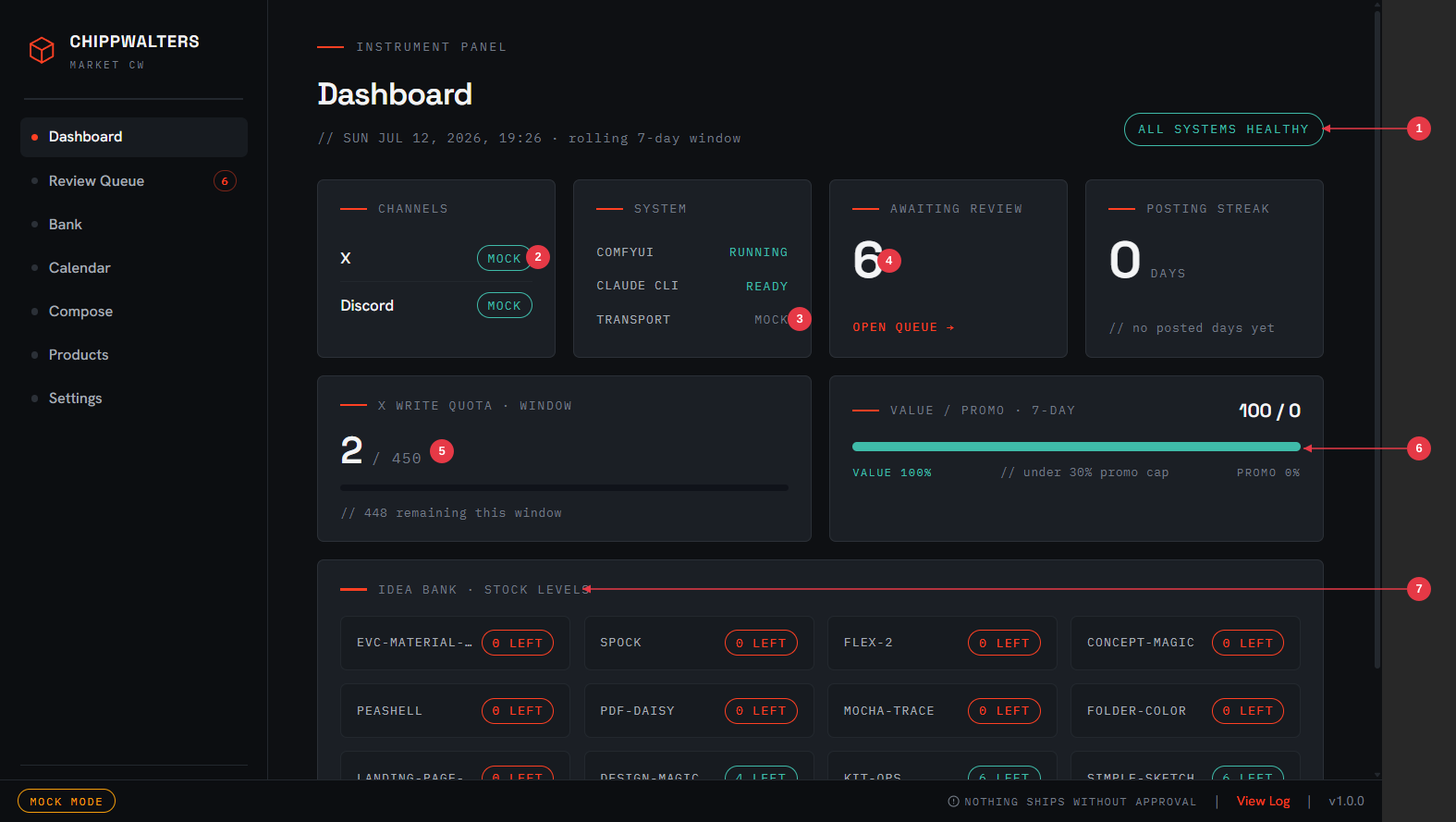
- Health pill — the hourly health check’s verdict (ComfyUI, Claude CLI auth, disk, quota); anything wrong turns this into a warning
- Channel badges — per-channel transport state; MOCK until you flip to real
- Transport readout — the system tile repeats the mock/real state alongside ComfyUI and Claude CLI status
- Awaiting review — how many items need your verdict; OPEN QUEUE jumps there
- X write quota — ledger usage against the 450-writes-per-window hard stop
- Value/promo gauge — the rolling 7-day ratio; stays teal at or under the 30% promo cap, turns red if an override pushes past it
-
Idea bank stock levels — per-product available (approved, off-cooldown) entries; red
0 LEFTmeans that product’s slots will go unfilled until you curate
Your morning glance. Green and quiet means the machine is healthy; anything that needs you is a tile or flag here.
Review Queue — the approval gate
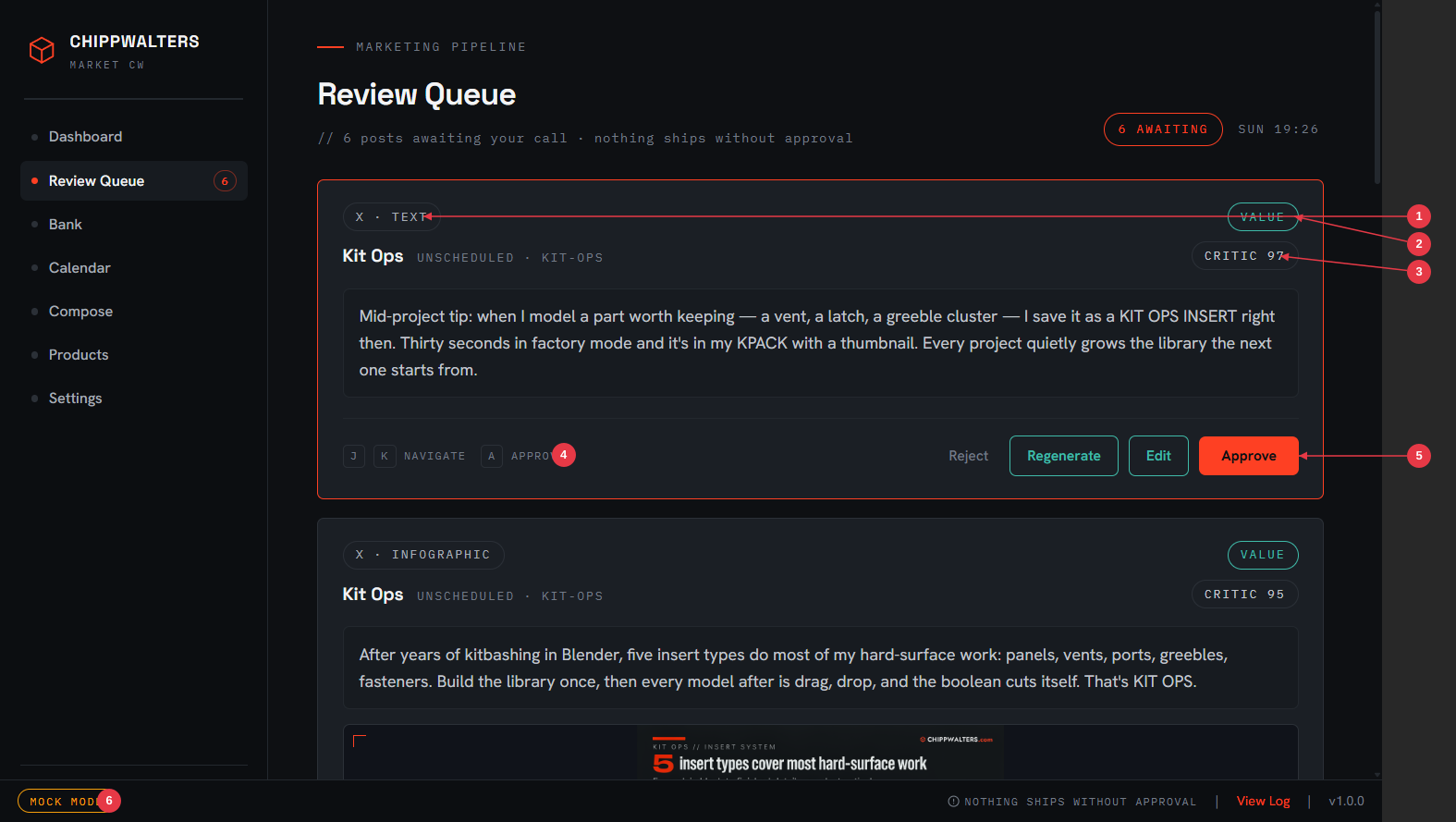
- Channel · content kind badge — where this will post and what it is (text, infographic, thread, video)
- Classification pill — VALUE or PROMO; this is what the 70/30 gauge counts
- Critic score — the brand-voice score out of 100 (gate is 80); click into the card for the critic’s notes
-
Keyboard hints —
J/Kmove between cards,Aapproves the focused one - The verdict row — Reject / Regenerate (with a note) / Edit / Approve
- MOCK MODE badge — always visible in the status bar until transport is real
The core screen. One card per item, with the generated text inline-editable and image/video previews below it. A similarity flag appears if the post overlaps a recent one too closely. Cards also arrive here flagged when something upstream went wrong — see When things go wrong.
Bank — the creative source
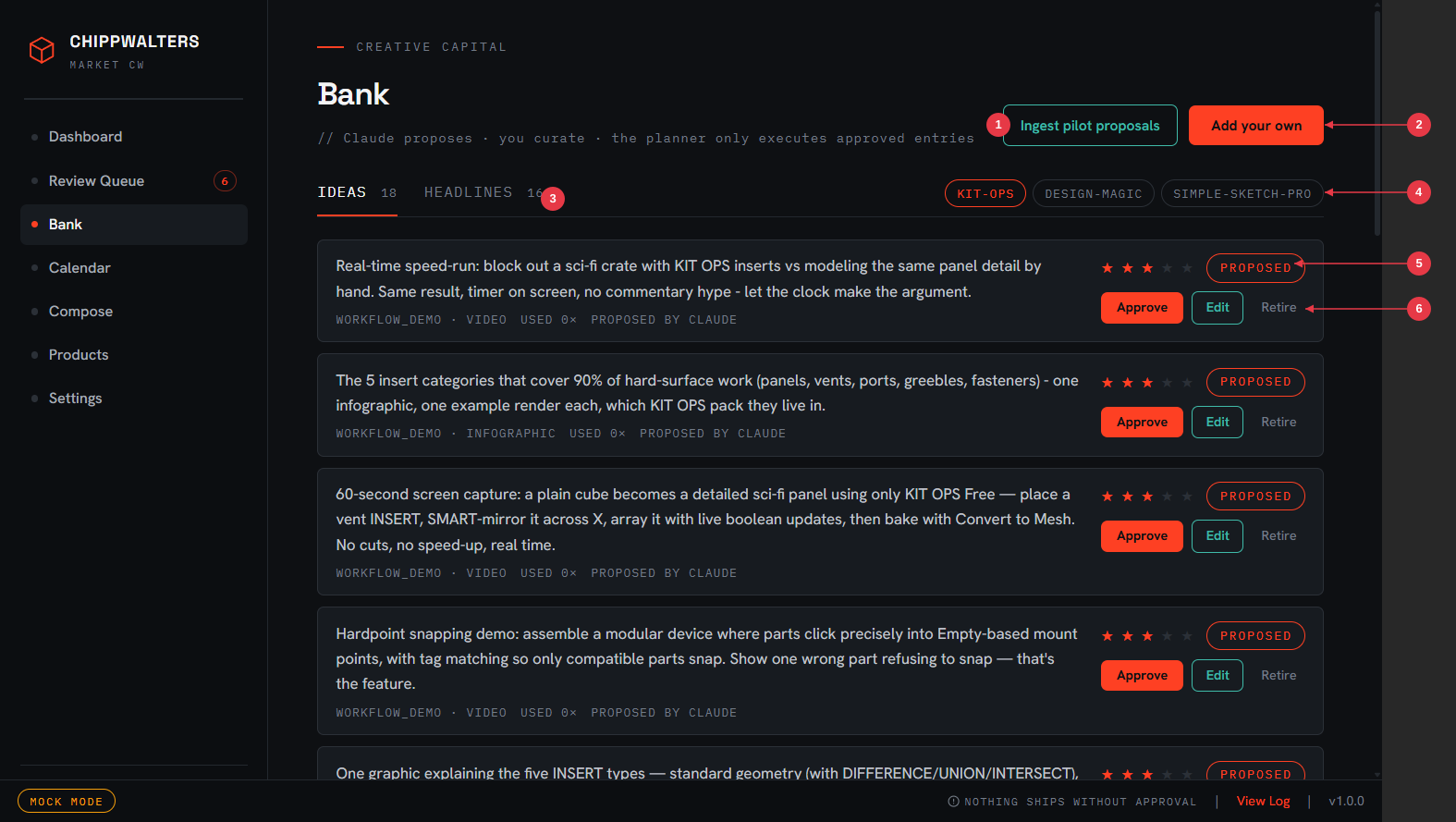
- Ingest pilot proposals — pull in a fresh ideation run’s candidates (the Sunday job does this automatically)
- Add your own — hand-write an idea or headline; user entries follow the same rules as Claude’s
- IDEAS / HEADLINES tabs — the two banks, with available counts
- Product filter — view one product’s entries at a time
- Status chip + priority stars — PROPOSED awaits your verdict, APPROVED is plannable; stars (1–5) weight the planner’s pick
- Approve / Edit / Retire — your curation verdict per entry
Idea Bank and Headline Bank, per product. PROPOSED entries (from Sunday ideation) wait for your verdict; APPROVED entries are what the planner draws from; RETIRED entries are kept for the record but never used. Times-used and last-used dates show what’s earning its keep.
Calendar — the week at a glance
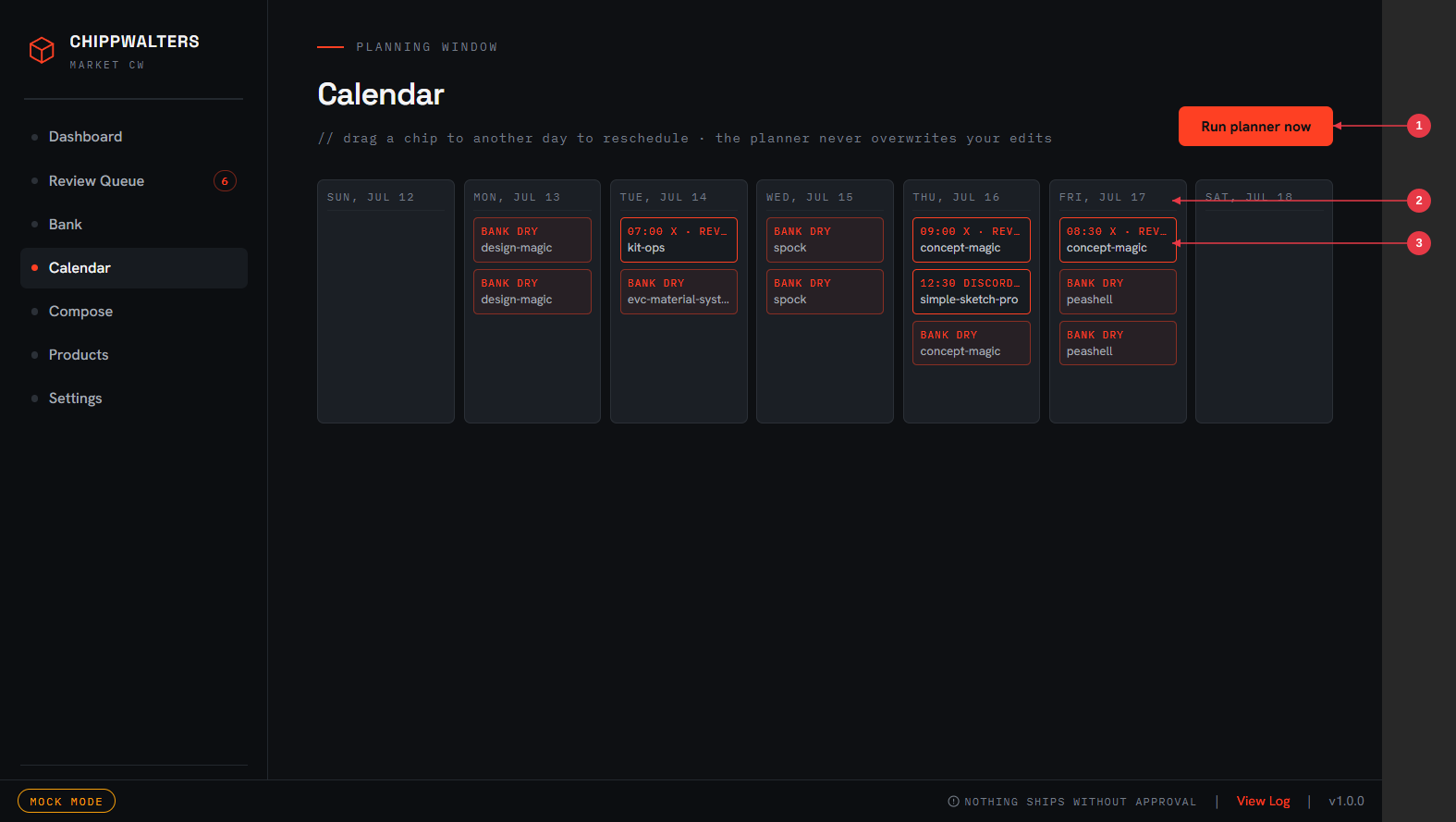
- Run planner now — fill upcoming empty slots immediately instead of waiting for 1:30 AM (safe to press any time; the planner never overwrites)
- Scheduled chip — a planned item with its slot time and status; drag to another day to reschedule (wall-clock time is preserved). Posted and in-flight items appear dimmed and can’t be dragged.
- BANK DRY chip — the planner wanted to fill this slot but the product had no approved, off-cooldown entry; curate the bank and re-run the planner
The planning window, one column per day. Only items that haven’t entered the posting machinery yet (idea / review / approved) can be dragged; posted and in-flight items are locked. (Weekends have no slots, so Sat/Sun columns stay empty.)
Compose — manual one-offs
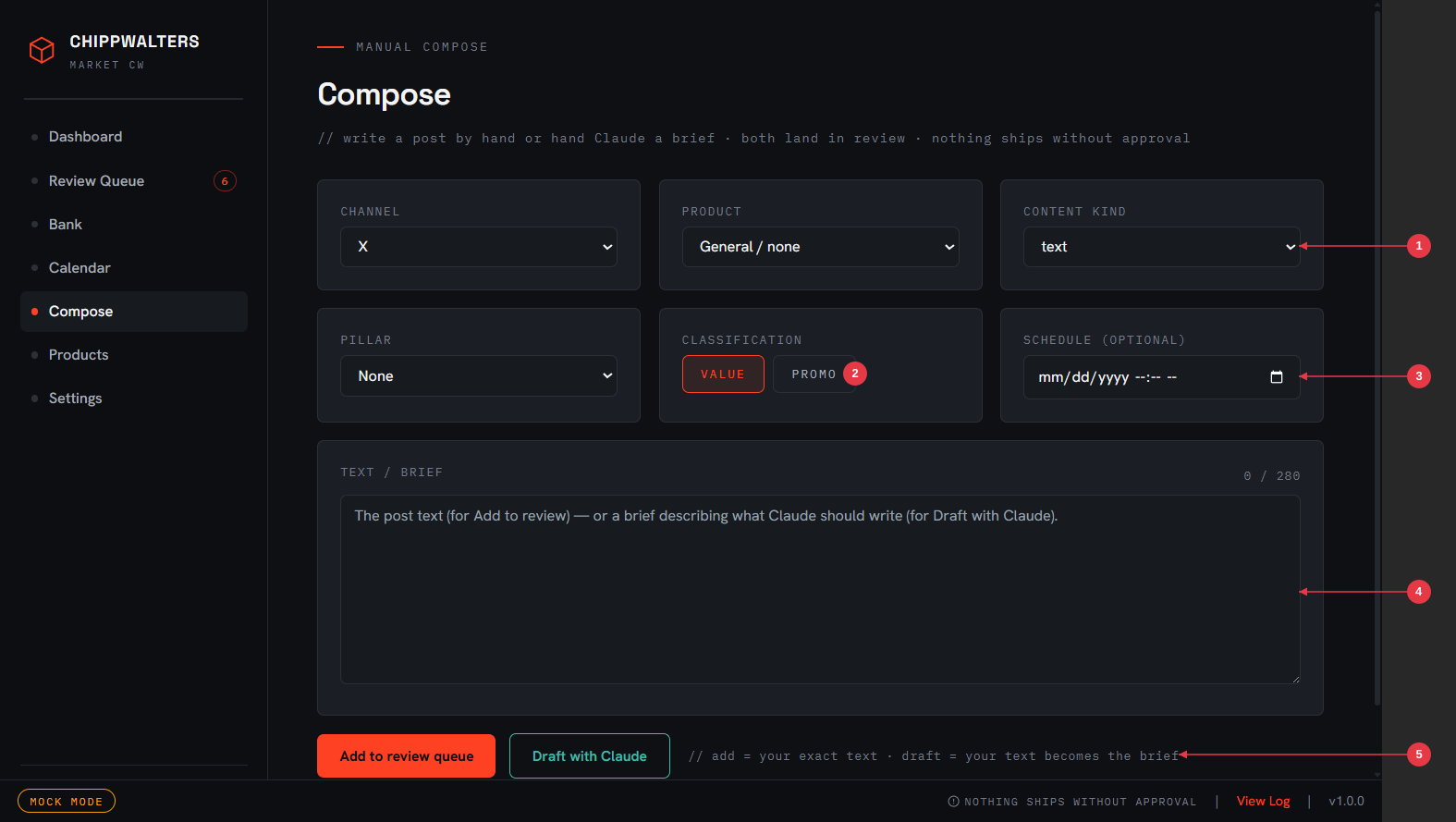
- Channel / product / content kind — where it posts, what it’s about, what it is
- Classification — VALUE or PROMO; manual posts count against the 70/30 gauge like everything else
- Schedule (optional) — pick a slot time, or leave it unscheduled and post-approve it manually
- Text / brief — live character count against the channel’s limit
- Two ways in — Add to review queue uses your exact text; Draft with Claude treats your text as the brief and runs the full generation lane, critic included
For posts outside the plan. Either way the item lands in the Review Queue and passes the same validators — character limits, banned phrases, ratio classification. A manual post is never a back door around the gates.
Products — the rotation editor
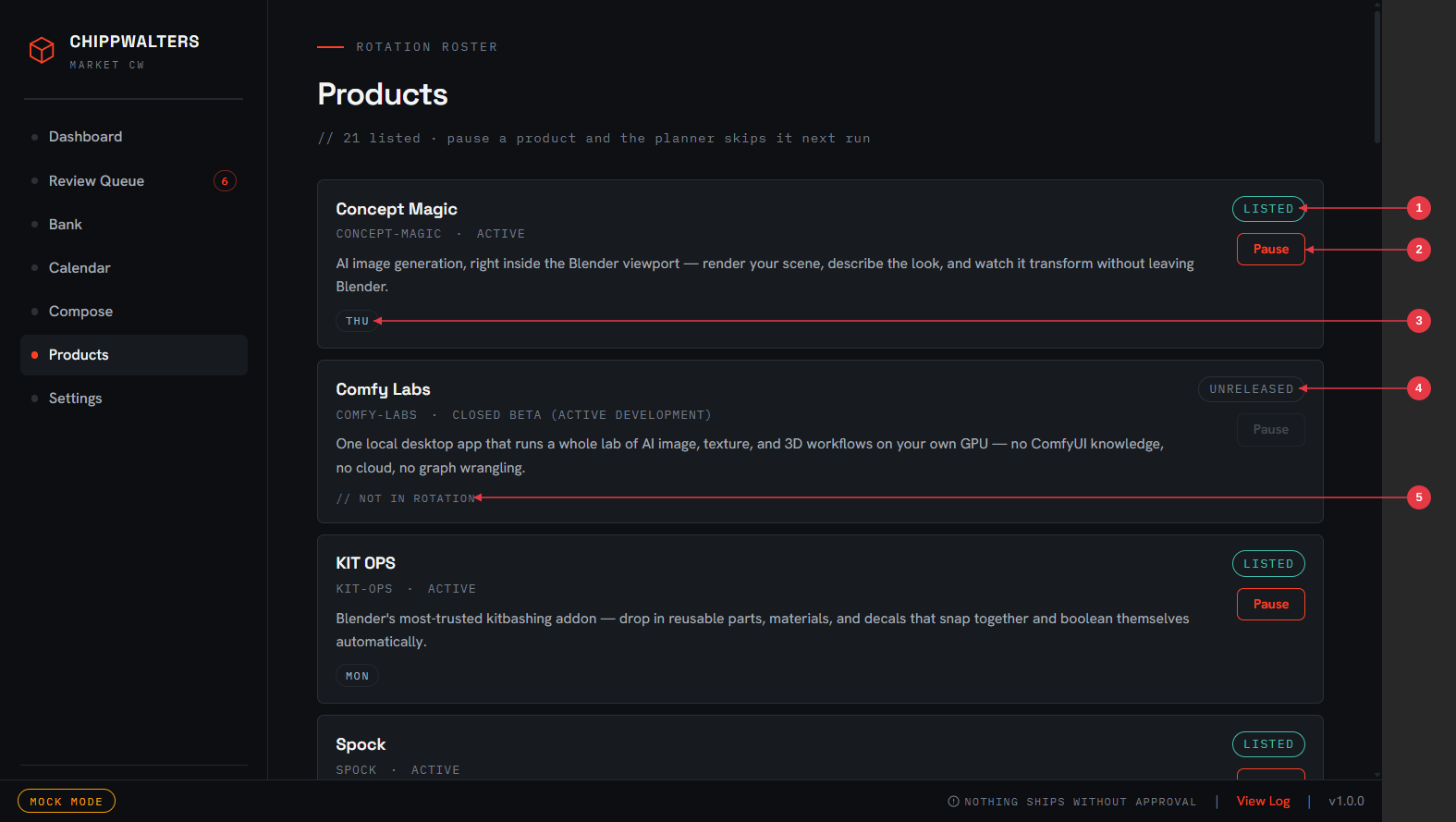
- LISTED pill — this product is marketable and in the planner’s universe
- Pause — take a product out of rotation; its slots stay empty rather than being back-filled (you’ll see the gap on the Calendar)
- Rotation day chip — which weekday features this product
- UNRELEASED pill — closed-beta / early-development products are excluded by default and never marketed unless you opt them in
- NOT IN ROTATION note — listed but not on the weekly rotation (available to Compose, skipped by the planner)
Every product from the catalog (docs/brand/products.json) with its rotation
day and status. Rotation and caps live in config/rotation.json; this screen is
the safe way to change them.
Settings — transport, channels, appearance
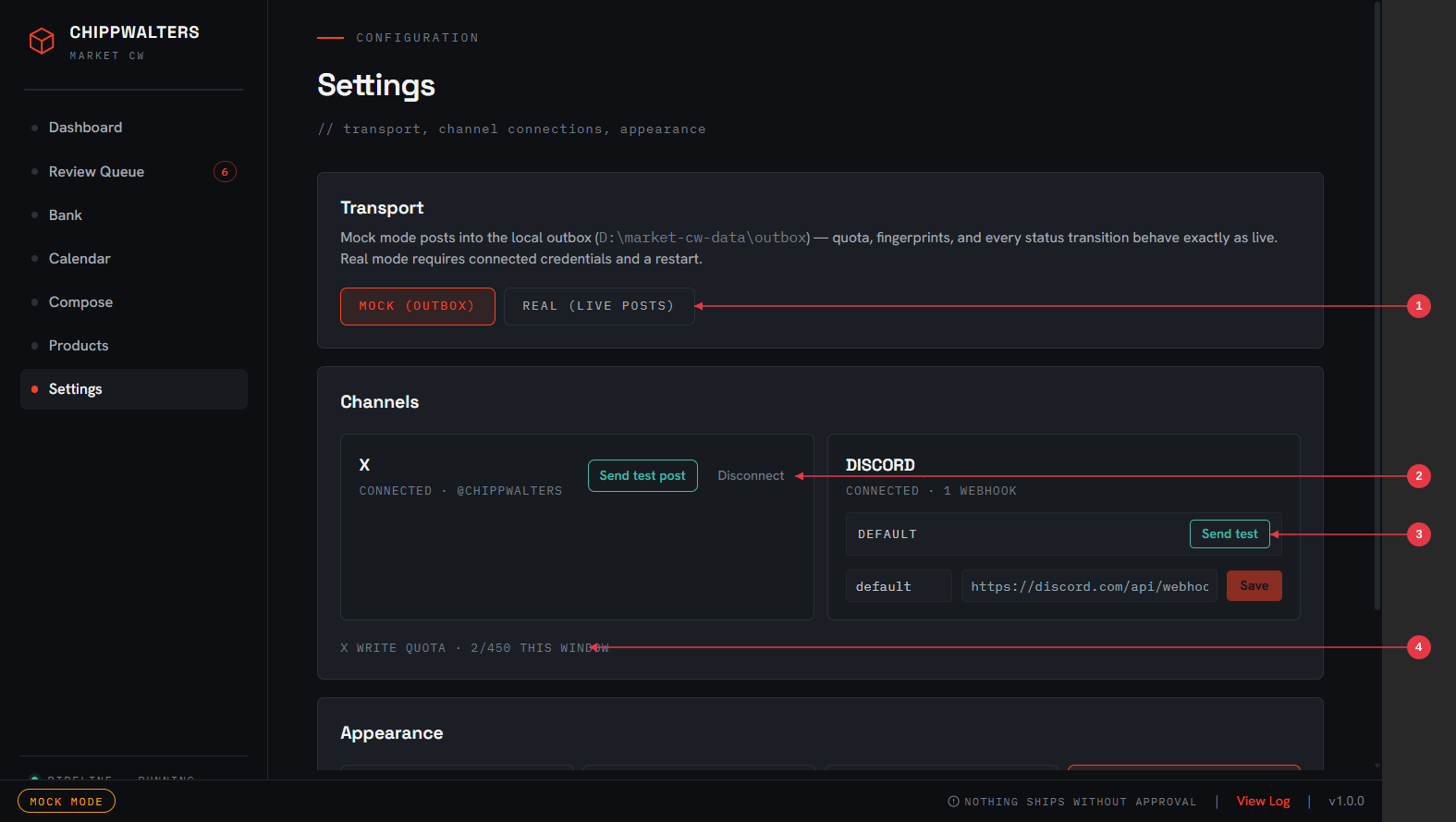
- Transport toggle — MOCK (outbox) vs REAL (live posts); the one switch that makes the app post publicly. Real requires connected credentials and a restart.
- X card — connection status, Send test post (a real, paid post to your timeline — it asks first) and Disconnect (wipes tokens from the vault)
- Discord card — saved webhooks by name with a Send test per webhook; paste a new webhook URL below to add one
- X write quota — the same ledger meter as the Dashboard, next to the thing that spends it
Below these sits an Appearance section (theme selection; Noir / Toolmaker Noir is the default). Credentials are encrypted with Windows DPAPI into the vault; they never appear on screen and never leave the main process — the webhook URL field is write-only and token blobs have no UI at all.
4. The safety rails, stacked
From inside out — each one holds even if the ones before it fail:
- The approval gate. No item reaches the dispatcher without a human clicking Approve. Architectural, not a setting.
- Planner constraints. Max 2 X posts/day, 1 primary product/day, ≤30% promo in any rolling week (5% tolerance), 60-day reuse cooldown, threads capped at 5 tweets. Violations aren’t errors you can hit — the planner simply never creates them.
- Dry banks stay dry. No approved entry available → slot unfilled + flag. The app never invents content.
- The write ledger. Every X write is recorded before the next is allowed; hard stop at 450 writes per window regardless of what any other code thinks. On top of that, the X platform spend cap (set to $10/cycle on the developer dashboard) bounds the worst case in dollars.
-
Grace windows. PC asleep at slot time? Within grace (X: 2 h, Discord: 6 h)
the item posts late and is marked
posted_late. Past grace it returns to review flaggedmissed. Never silently skipped, never posted stale. -
The posting-interrupted protocol. If the app dies mid-post, the item is
frozen at
postingand flaggedposting_interruptedon relaunch — it is never auto-retried, because the post may have gone out just before the crash. You check the channel and decide. Partial threads are likewise never auto-resumed. - Mock isolation. While transport is MOCK, no code path can reach x.com or discord.com — enforced in tests, visible as the status-bar badge.
5. Schedules reference
All times are America/Chicago wall-clock (DST-correct — a 10:00 slot is 10:00 year-round).
| Job | When | What it does |
|---|---|---|
| Planner | 1:30 AM daily | Fill the next 7 days’ empty slots from approved bank entries |
| Generator | 2:00 AM daily | Drain planned items through headless Claude, serially |
| Ideation | Sunday 3:00 AM | Propose bank candidates for under-stocked pilot products |
| Backup | Sunday 4:00 AM | Copy market.db to D:\market-cw-data\backups\ |
| Health check | Hourly | ComfyUI, Claude CLI auth, disk space, quota — problems → Dashboard |
| Dispatcher | Every 60 s | Post approved items whose slot has arrived |
The app must be running for any of this to happen — that’s why closing the window minimizes to the tray instead of quitting. If it wasn’t running, every job catches up on launch (the planner plans, the generator drains, the dispatcher applies the grace-window rules above).
6. When things go wrong
Failures never disappear — they come back to the Review Queue wearing a flag:
| Flag | Meaning | What you do |
|---|---|---|
critic_fail |
Scored <80 twice | Read the critic notes; edit, regenerate, or reject |
failed |
Posting failed after retries (network, API error) | Check Settings → channel status; approve again to retry |
missed |
Slot passed while app was closed, beyond grace | Reschedule via Calendar or reject |
posting_interrupted |
App died mid-post | Check the channel first — the post may be live. Then reject (if it posted) or approve (if it didn’t) |
Other signals: dry-bank flags on Dashboard/Calendar mean curate that product’s bank; a NEEDS REAUTH note on the X card means tokens expired — click Connect again; hourly health problems (ComfyUI down, Claude auth expired, low disk) surface as Dashboard warnings and tray notifications.
7. Mock vs. real — and the go-live checklist
You are in mock until you decide otherwise. The practice loop is the real loop:
curate on Sunday, review each morning, and watch outbox files appear at slot
times in D:\market-cw-data\outbox\. When a week’s worth of outbox posts is
consistently something you’d have been happy to see live, the flip is a
formality.
When (and only when) you decide to go live:
- Banks stocked for the coming week’s rotation (no dry-bank flags on Dashboard)
- No stale approved items sitting in the queue from practice runs
-
X card shows CONNECTED · @CHIPPWALTERS, no reauth warning; Discord card
shows the
cw-updatewebhook - X platform spend cap confirmed at $10/cycle on the developer dashboard (X is pay-per-use: ~$0.015/post, $0.20/post with URL — roughly $1–12/month at plan volume)
- Settings → Transport → REAL, confirm the dialog, restart the app
- The MOCK badge is gone from the status bar; the next approved item at its slot posts publicly
To stand down at any time: Transport → MOCK, restart. Nothing else changes.
8. Where everything lives
| What | Where |
|---|---|
| App code | D:\GitHub\market-cw\ |
| Database | D:\market-cw-data\market.db (SQLite, WAL) |
| Per-item work folders | D:\market-cw-data\items\<itemId>\ |
| Mock outbox | D:\market-cw-data\outbox\ |
| Weekly DB backups | D:\market-cw-data\backups\ |
| Logs | D:\market-cw-data\logs\ |
| Credentials | Encrypted (DPAPI) in electron-store — never in the repo, never in the DB |
| Rotation & caps config | D:\GitHub\market-cw\config\rotation.json (editable via Products screen) |
| Brand truth | docs/brand/BRAND.md, docs/brand/products.json (snapshots of D:\GitHub\Brand-Mktg\) |
Nothing under D:\market-cw-data\ is ever committed to git.