Blender to Unreal Engine: Virtual Art Museum
Contents
- Project Overview
- 1. Blender-to-Unreal Workflow
- 2. Hybrid Shared-Shell Architecture
- 3. Baked Lighting and Dynamic Artwork
- 4. Artwork Images: Memory, Formats and Loading
- 5. Memory and Storage Estimates
- 6. Benefits
- Recommendation
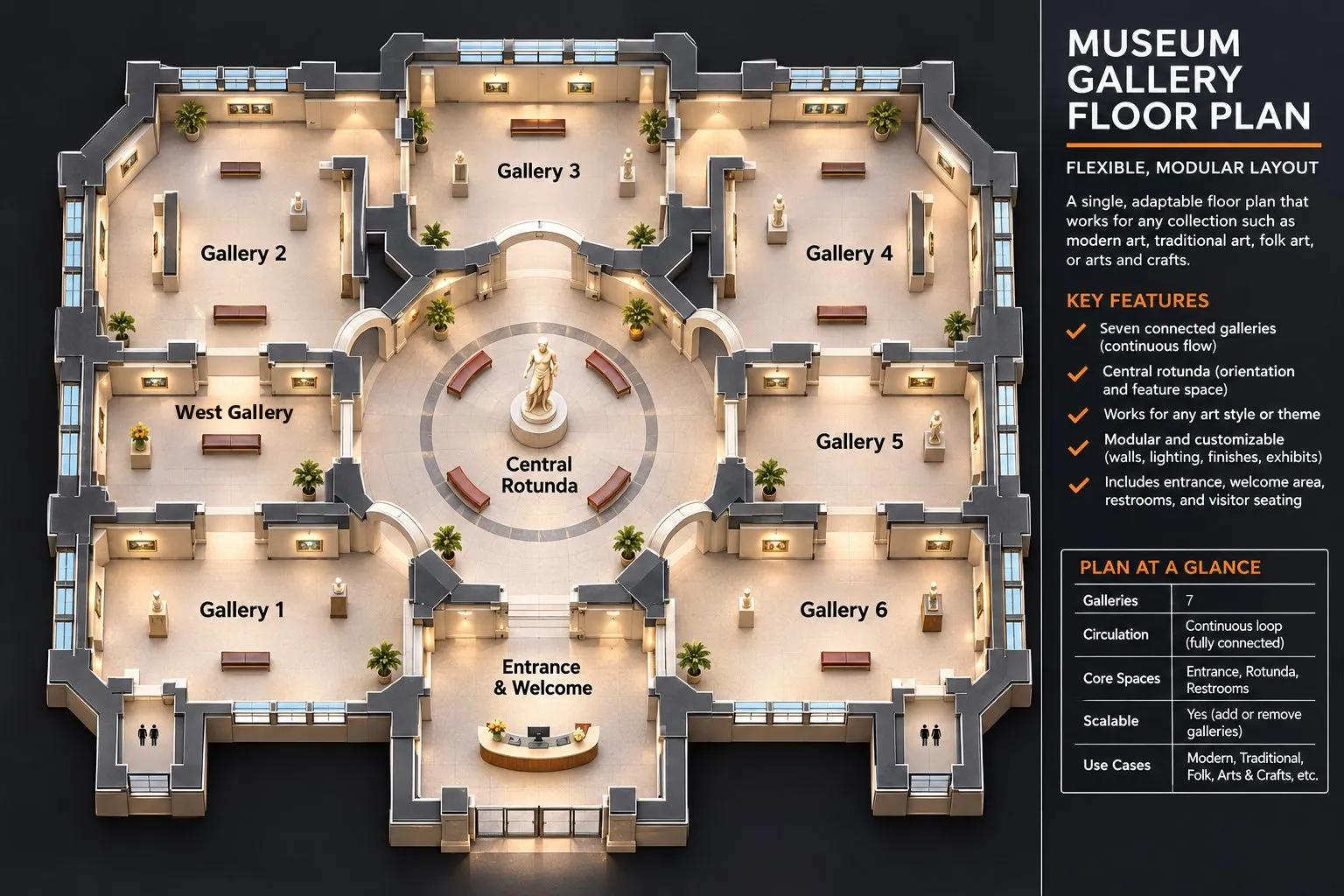 7 gallery floorplan
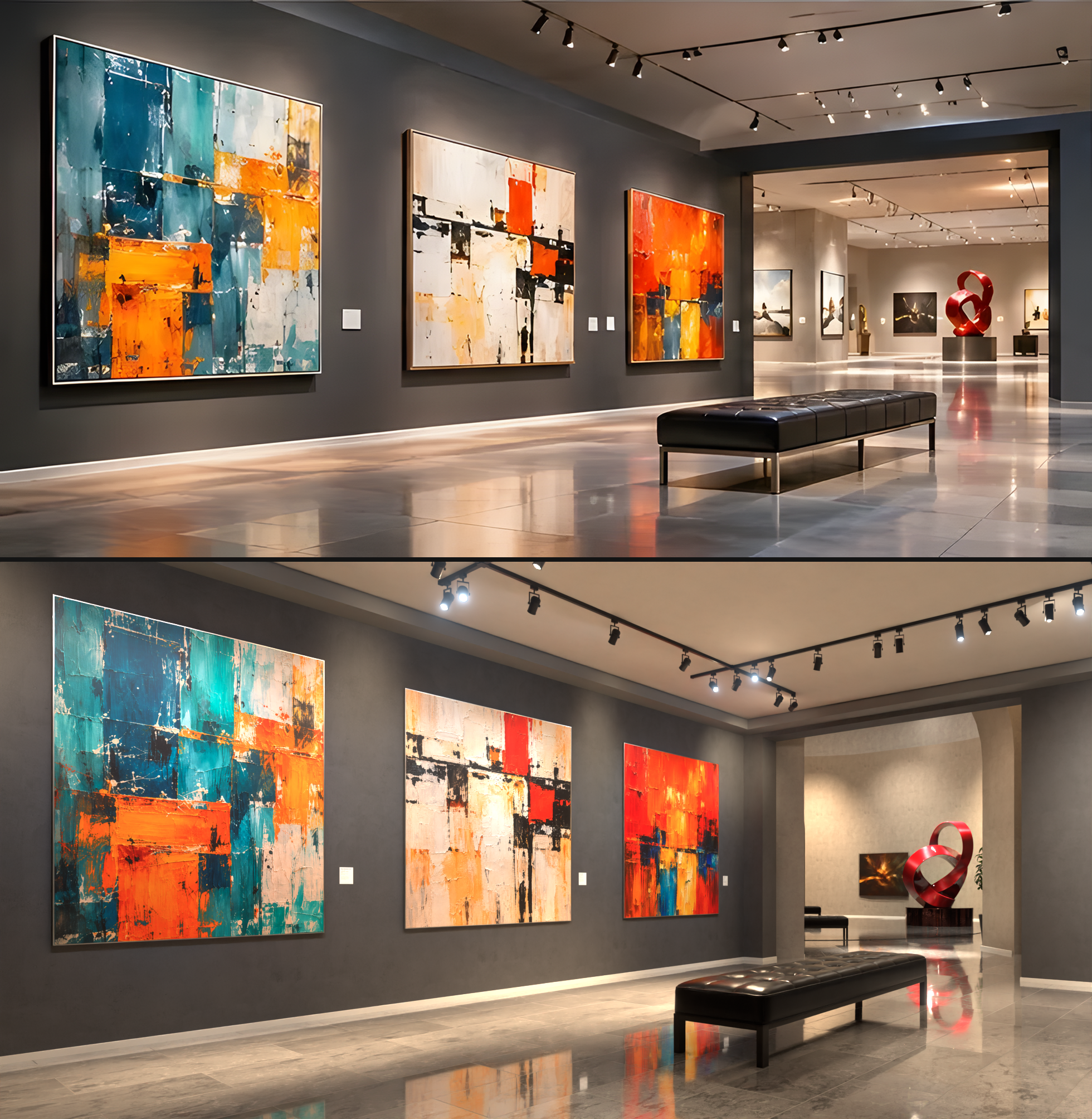 Top reference photo, bottom Blender model
Executive Summary | Seven Galleries, Three Themes, Meta Quest, PC VR, Android & iPhone
Project Overview
Create a high-quality virtual art museum consisting of seven interconnected galleries, an entrance hall and a central rotunda. Artists can upload, position, and display their own artwork. The recommended architecture is a hybrid shared-shell system, designed to reduce duplication and support standalone Meta Quest headsets, PC VR, Android phones and iPhone.
Galleries and Artwork
Artwork hangs in eight rooms (the seven galleries and the Entrance) plus the Rotunda. Counts and sizes come from the Blender model (modern_art_gallery_v020.blend).
| Room | Plan position | Floor (m) | Ceiling (m) | Artworks | Artwork sizes, W×H (m) |
|---|---|---|---|---|---|
| Gallery 1 | Bottom left | 11.8 × 9.4 | 4.0 | 5 | 1.6×2.0 to 2.1×2.5 |
| Gallery 2 | Top left | 13.8 × 12.4 | 6.0 | 10 | 1.6×1.6 to 2.4×1.8 |
| Gallery 3 | Top centre | 13.2 × 8.0 | 6.0 | 6 | 1.6×1.6 to 2.8×2.0 |
| Gallery 4 | Top right | 13.8 × 12.4 | 6.0 | 10 | 1.6×1.6 to 2.4×1.8 |
| Gallery 5 | Middle right | 10.2 × 9.2 | 6.0 | 5 | 1.6×2.0 to 3.6×2.2 |
| Gallery 6 | Bottom right | 11.8 × 9.4 | 6.0 | 5 | 1.5×2.3 to 2.2×3.0 |
| West Gallery | Middle left | 10.2 × 9.2 | 6.0 | 5 | 1.6×2.0 to 3.6×2.2 |
| Entrance & Welcome | Bottom centre | 12.0 × 8.6 | 6.0 | 4 | 1.4×1.8 to 2.0×1.6 |
| Central Rotunda | Centre | 16.2 × 20.0 | 7.0 | 2 | 2.2×1.8 to 3.0×2.4 |
| Total | 52 |
Galleries 2 and 4 each include two works hung on a freestanding central wall. Memory for these images is covered in section 4.
1. Blender-to-Unreal Workflow
- Build and prepare in Blender. Model the complete museum, furnishings, sculptures, and decorative elements. Preserve high-resolution masters while preparing optimized geometry, UV maps, and texture assets.
- Export and import into Unreal Engine. Transfer meshes using FBX, including UVs and material assignments. Recreate Blender shaders as efficient Unreal materials and generate conventional LODs for standalone VR.
- Create interchangeable museum themes. Keep the architectural shell shared; swap materials, lighting configurations, furnishings, and optional decorative geometry.
- Bake architectural lighting. Precalculate lighting on empty walls, floors, ceilings, and permanent objects. Bake each theme as its own Unreal Lighting Scenario, with that theme’s materials and lights loaded.
- Implement dynamic artwork displays. Artists upload images, choose dimensions and frames, and arrange works independently of the architectural lighting bake. The server resizes and compresses every upload for each platform (section 4).
- Optimize and deploy. Profile on physical Quest hardware and on the minimum supported Android phone and iPhone. Optimize draw calls, textures, geometry, and shaders, and offer higher-fidelity settings for PC VR.
2. Hybrid Shared-Shell Architecture
Permanent core: Seven galleries, central rotunda, circulation, structural geometry, collision, and navigation.
Interchangeable theme packages:
- Modern Art: Contemporary surfaces, clean lighting, minimalist fixtures.
- Traditional Art: Rich finishes, classical details, warmer lighting.
- Dark Photography: Dark surfaces, controlled lighting, luminous-looking prints.
Each theme provides its own materials, textures, lighting data, furnishings, and optional decorative meshes. Artwork collections should be packaged independently of themes. Only the active theme needs to remain loaded in memory; inactive themes can stay on disk or be downloaded as needed.
3. Baked Lighting and Dynamic Artwork
Architectural lighting: Bake gallery walls without paintings installed. Floors, ceilings, and permanent features receive precomputed illumination appropriate to the theme. This avoids rebaking when artists change exhibitions.
Lighting Scenarios: The shared shell lives in the persistent level. Each theme is a separate Lighting Scenario sublevel holding that theme’s lights, and its bake stores the lightmaps for the whole shell. Bake every scenario with its theme’s materials applied, because bounced light takes its color from wall and floor surfaces. Swapping materials over another theme’s bake gives incorrect light. Only one scenario is active at a time, and switching themes loads the matching scenario. Every theme with different materials or lighting needs its own bake, which adds lightmap storage per theme.
Artwork illumination: Use a shared Unreal artwork material with a procedural emissive or luminance mask. A soft elliptical gradient can brighten the center and fade toward the edges, simulating a gallery spotlight. Theme parameters control brightness, warmth, falloff, and luminous-print behavior. The original image remains unchanged. This material effect does not physically illuminate the surrounding wall.
Artwork mounting: Each artwork is an independent display object with adjustable dimensions, frame, plaque, and optional inexpensive contact-shadow approximation. Avoid baking artwork-specific shadows or spotlight patterns into walls when placement is flexible.
Reflective floors: Combine baked diffuse illumination with polished materials and inexpensive reflection approximations for Quest. More accurate real-time reflections may be used on capable PC VR systems. Reflection captures do not automatically reflect newly changed paintings.
4. Artwork Images: Memory, Formats and Loading
Design principle: build for good hardware, scale down
We do not design the museum around the weakest supported device. Doing so would cripple the experience on every other platform. Instead, the full design targets Meta Quest 3 and phones with 8 GB of RAM or more. PC VR scales up from there, and Quest 2 and lower-memory phones scale down. AAA games are built the same way: Unreal’s Device Profiles and scalability settings apply a quality tier per device class automatically.
| Tier | Devices | Artwork | Themes | Other reductions |
|---|---|---|---|---|
| Ultra | PC VR | 2K BC7, 4K for close-ups if wanted | All | Real-time reflections, higher lightmap resolution, denser furnishings |
| High (design target) | Quest 3/3S, phones with 8 GB+ | 2K ASTC, all 52 loaded (≈ 99 MB) | One active theme | None; the full design |
| Medium | Quest 2, phones with 6 GB | 2K ASTC, loaded room by room | One active theme | Lower render resolution, fewer reflection captures |
| Low | Phones with 4 GB | 1K ASTC (≈ 25 MB for 52), 2K swapped in up close | One theme, downloaded on demand | Simplified furniture and plants, lower-resolution lightmaps, simplified Rotunda dome |
4 GB phones still matter: they include the iPhone 11, 12 and 13, and the iPhone 13 is currently the most used iPhone model. If the Low tier cannot fit, a separate lite app or a 2D gallery of the same artwork are fallbacks; the High design does not change.
Scaling down only works if it is planned from the start. As long as these decisions are made now, lower tiers become settings rather than rework:
- Author every asset at the top tier, with LODs and mipmaps. Generate LODs (simplified versions of each mesh) for the shell, furniture, plants and sculptures from the beginning. Lower tiers then pick a smaller LOD or mip instead of needing new assets.
- Keep architectural lighting baked. Baked lighting runs on every tier. Real-time global illumination (Lumen) can be an Ultra-only addition on PC VR; it must not be part of the core design, or Quest and phones become a separate project.
- Keep the hybrid shared-shell structure. One shell, one active theme and independent artwork packages let each tier load only what it can hold.
- Set a memory budget per tier now. Section 5 gives the High budget; the Medium and Low budgets are set the same way and confirmed on real devices.
- Test the Low tier at every milestone, not at the end. Keep a 4 GB test phone (iPhone 11 or 13) in every milestone check, so a decision that will not scale down is caught while it is still cheap to change.
Device memory limits
Quest renders every frame twice (once per eye) at 72–90 fps on a mobile GPU. Android phones and iPhone render a single view, so their GPU load is lower, but their memory depends on the phone.
| Device | Memory available to the app |
|---|---|
| Meta Quest 3 / 3S | 5.75 GiB |
| Meta Quest 2 / Pro | 4.4 GiB |
| Android phones, iPhone | No fixed published limit; depends on the phone’s RAM and what else is running |
Quest limits: Meta, Memory / RAM (Unreal). Apple and Google do not publish a per-app memory limit for phones. Phones with 4 GB of RAM can give the app less memory than a Quest 2, which is why they get the Low tier.
Memory per room
Every image is 2048 px on its long edge with mipmaps, keeping each artwork’s proportions. ASTC 6×6 is the compressed format for Quest, iPhone and most Android phones.
| Room | Artworks | 2K, ASTC 6×6 | 2K, uncompressed | 256 px thumbnails |
|---|---|---|---|---|
| Gallery 1 | 5 | 9.5 MB | 85 MB | 0.2 MB |
| Gallery 2 | 10 | 19.1 MB | 171 MB | 0.3 MB |
| Gallery 3 | 6 | 12.4 MB | 111 MB | 0.2 MB |
| Gallery 4 | 10 | 19.1 MB | 171 MB | 0.3 MB |
| Gallery 5 | 5 | 9.3 MB | 84 MB | 0.1 MB |
| Gallery 6 | 5 | 8.9 MB | 80 MB | 0.1 MB |
| West Gallery | 5 | 9.3 MB | 84 MB | 0.1 MB |
| Entrance & Welcome | 4 | 7.5 MB | 67 MB | 0.1 MB |
| Central Rotunda | 2 | 3.8 MB | 34 MB | 0.1 MB |
| Total | 52 | ≈ 99 MB | ≈ 886 MB | ≈ 1.6 MB |
All 52 artworks by format
| Format | Used on | Memory, 52 artworks |
|---|---|---|
| 2K, ASTC 6×6 | Quest, iPhone, Android: High and Medium tiers (recommended) | ≈ 99 MB |
| 1K, ASTC 6×6 | Phones with 4 GB: Low tier | ≈ 25 MB |
| 2K, ASTC 4×4 | Quest, iPhone, Android (sharper, if needed) | ≈ 222 MB |
| 2K, ETC2 | Android phones without ASTC | ≈ 111 MB |
| 2K, BC7 | PC VR | ≈ 222 MB |
| 2K, uncompressed | Raw upload loaded as-is (avoid) | ≈ 886 MB |
| 4K, ASTC 6×6 | Not recommended | ≈ 395 MB |
| 4K, uncompressed | Not recommended | ≈ 3.5 GB |
2K is enough: at Quest 3’s display resolution a painting rarely covers more than about 1,000 pixels across, even up close. These figures are calculated from the artwork sizes in the Blender model, not measured in Unreal.
Upload pipeline
Artwork uploaded by artists while the app is in use is not compressed by Unreal’s build process, so the server prepares it:
- Resize the upload to 2048 px on its long edge, keeping its proportions, plus a 1024 px copy for the Low tier.
- Generate mipmaps.
- Compress one copy per platform: ASTC 6×6 for Quest, iPhone and Android; ETC2 for Android phones without ASTC; BC7 for PC VR.
- Make a 256 px ASTC thumbnail.
- Each device downloads only its own format.
Never compress on the device. ASTC compression is slow, and doing it on a Quest during a VR session causes stutter.
Loading strategy
| Stage | When to use it | How it works | Artwork memory, Quest |
|---|---|---|---|
| 1. Load everything | First release; up to several hundred artworks at 2K | Load all 52 compressed 2K images when the museum opens | ≈ 99 MB |
| 2. Load by room | Collections grow into the hundreds, or 4K images are added | Keep the current room and the rooms visible or reachable from it loaded; free the rest | 4–19 MB per room loaded |
| 3. Low resolution far, full resolution near | Together with stage 2 | Keep every 256 px thumbnail loaded; swap in the 2K image when the visitor enters the room or comes within a few metres, with a short fade | ≈ 1.6 MB of thumbnails plus nearby 2K images |
- Start with stage 1. At 52 artworks it costs about 99 MB, it is simple, and nothing visibly pops in.
- Unreal’s automatic texture streaming loads low detail far away and full detail near, but only for artwork packaged into the app. Artist uploads need a small custom loader for stages 2 and 3.
- The Rotunda is a hub. It opens onto most rooms on the floor plan, so loading by neighbouring room keeps most artwork loaded while the visitor is there. Load by distance or line of sight instead.
- Mipmaps already keep distant paintings cheap to draw. Stages 2 and 3 save memory, not GPU time.
5. Memory and Storage Estimates
Active memory for the High tier (Quest 3, the design target) with one theme loaded and all 52 artworks at 2K (stage 1):
| Item | Memory | Basis |
|---|---|---|
| Building, furnishings, theme textures and lightmaps | 350–750 MB | Estimate |
| Artwork, 52 images, 2K ASTC 6×6 | ≈ 99 MB | Calculated |
| Artwork thumbnails | ≈ 1.6 MB | Calculated |
| Unreal engine, VR rendering, audio and runtime | ≈ 1–1.5 GB | Estimate, not measured |
| Total | ≈ 1.5–2.4 GB | About a quarter to two-fifths of Quest 3’s 5.75 GiB limit |
PC VR, one active theme: about 600 MB–2 GB of assets, plus the engine and runtime.
| Architecture | Quest installed asset storage, three themes | PC VR installed asset storage, three themes |
|---|---|---|
| Three independent museums | 1.8–3.6 GB | 3–7 GB |
| Shared shell plus three theme packages | 1–2 GB | 2–5 GB |
Important: The building, theme and engine figures are budgeting estimates, not measured Unreal project figures. The artwork figures are calculated from the 52 artworks in the Blender model. Artwork downloads are separate from the installed storage above: about 99 MB per device for the current collection. Set equivalent budgets for the Medium and Low tiers, and measure real memory use on a Quest 3, a Quest 2 and a 4 GB phone. Separate museums can also unload inactive levels, so the hybrid approach’s biggest advantages may be storage, download size, and maintenance rather than dramatic active-RAM savings.
6. Benefits
- One architectural model: Build and maintain the shared structure once.
- Multiple visual themes: Change the atmosphere without duplicating the entire museum.
- Flexible exhibitions: Add, move, or resize artist artwork without rebaking the architecture.
- VR performance: Favor baked lighting, optimized geometry, and reusable materials on standalone Quest.
- Platform flexibility: One design, delivered in quality tiers (Ultra, High, Medium, Low) through Unreal Device Profiles for PC VR, Quest, Android phones and iPhone.
- Expandable content: Download or update themes and exhibitions independently, subject to platform packaging and content-delivery requirements.
Recommendation
Develop the shared seven-gallery shell in Blender, with LODs for every asset from the start, and establish the Unreal import and optimization pipeline. Prototype Modern Art and Dark Photography first because their lighting requirements differ significantly. Validate theme switching, baked lighting, artwork emissive masks, the artwork upload pipeline, loading/unloading, and memory usage on Quest 3 (the design target) and on a 4 GB phone (the Low tier) before producing the third theme.
Guiding principle: Build the museum once, change its atmosphere through themes, and let artists populate it independently.