Story Video Production Workflow
by Chipp Walters
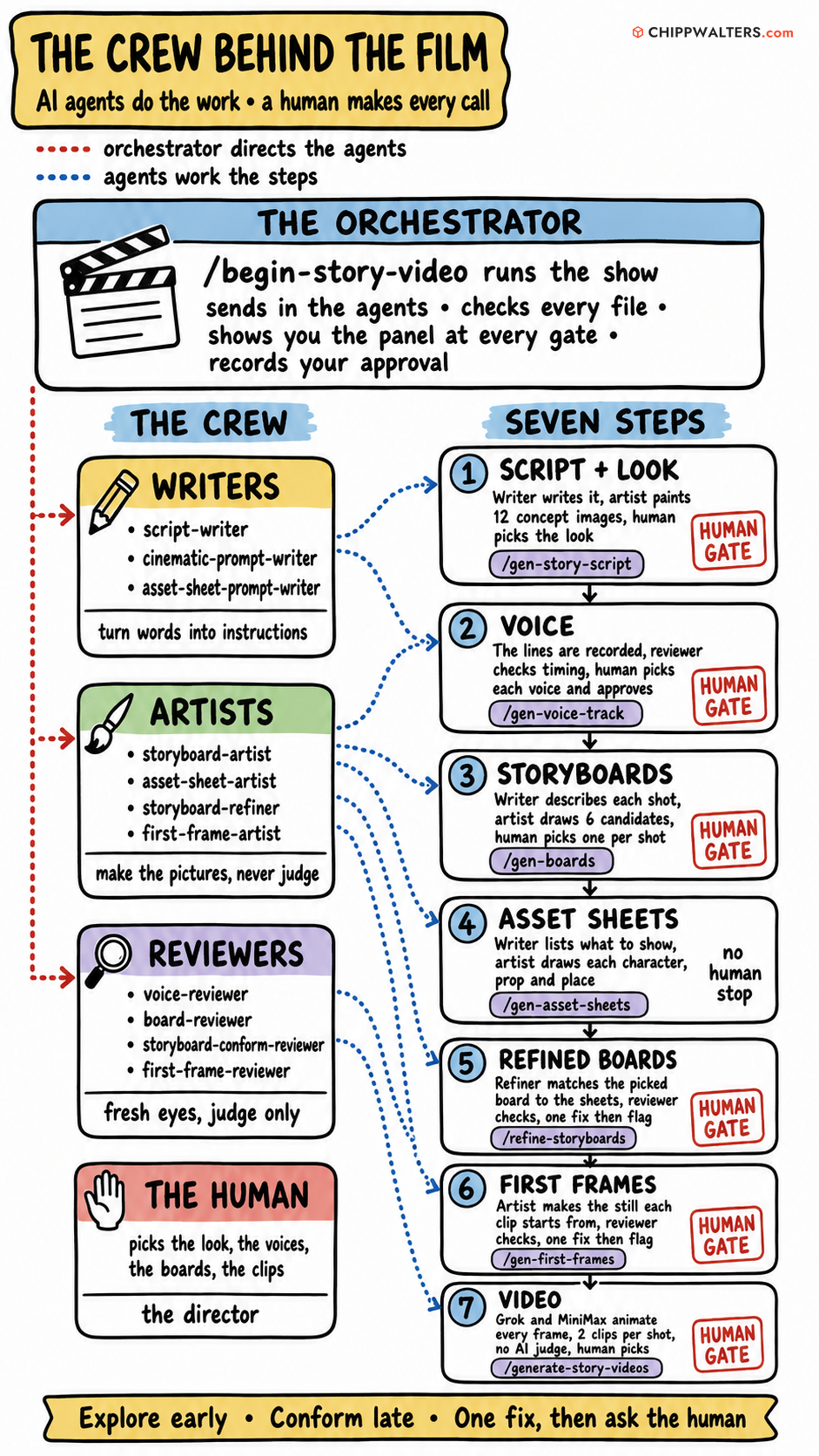
Purpose
This workflow begins with an existing story and turns it into a complete set of production-ready video shots through a staged process of scripting, visual development, human selection, asset consistency, storyboard refinement, First Frame generation, and final video rendering.
Story creation itself is outside the scope of this workflow. The story is provided as the starting input.
The core principle is simple:
Automation handles repetitive production work. Humans make the important creative decisions.
The system intentionally becomes more constrained as the project progresses:
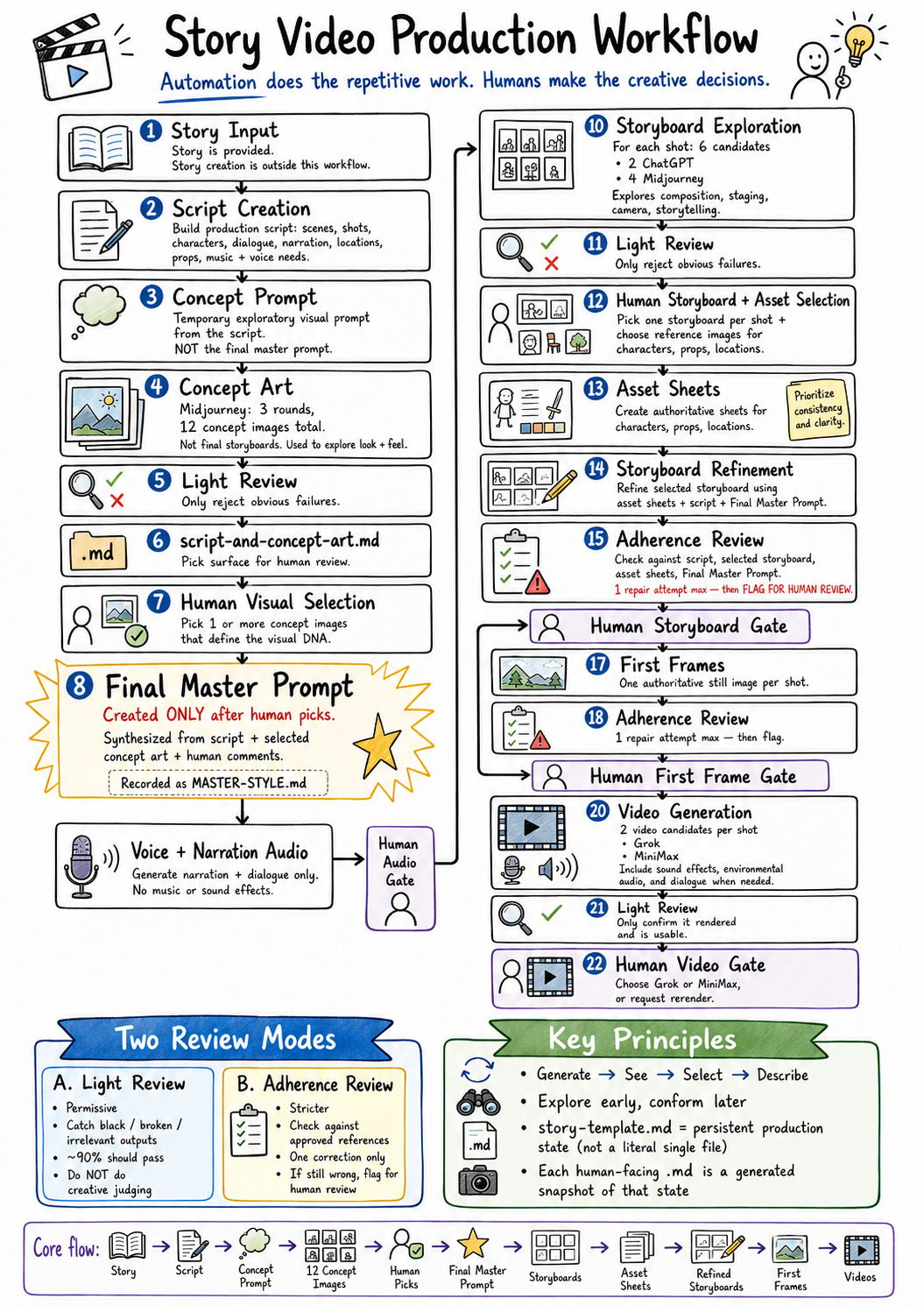
Story → Script → Concept Exploration → Human Visual Selection → Final Master Prompt → Storyboard Exploration → Human Selection → Asset Definition → Storyboard Refinement → First Frames → Video
Early generations are allowed to explore.
Later generations are expected to conform.
Whenever automated correction stops producing meaningful value, the system stops iterating and hands the decision back to the human.
How it works: The Complete Workflow
1. Story Input
Input
- Existing story
The workflow does not create the original story.
The story is supplied to the system and becomes the source material for everything that follows.
2. Script Creation
Inputs
- Story
Process
Generate the production script from the supplied story.
The script should identify, where applicable:
- Scenes
- Shots
- Characters
- Narration
- Dialogue
- Locations
- Props
- Important visual elements
- Music requirements
- Voice requirements
- Audio requirements
The script becomes the narrative and structural authority for the rest of the production.
3. Concept Prompt
The workflow does not create the Final Master Prompt yet.
At this stage, the system generates a temporary Concept Prompt.
Its purpose is to provide enough visual direction to explore possible looks for the production without locking the project into a final style too early.
Inputs
- Script
Concept Prompt Contents
The Concept Prompt may describe:
- Visual medium
- Approximate realism level
- General period or production design
- Broad cinematography direction
- Mood
- General color direction
- Lighting tendencies
- Camera tendencies
- Lens tendencies
- Environmental qualities
- Anything explicitly required by the story
The Concept Prompt is exploratory rather than authoritative.
In the pipeline it is derived from the script’s ## Style section and
emitted as a named artifact, concepts\CONCEPT-PROMPT.md, alongside the
per-round Midjourney prompts. It is superseded by the Final Master
Prompt the moment the human picks.
4. Concept Art Generation
Inputs
- Script
- Concept Prompt
Process
Use Midjourney to create three rounds of concept artwork, totaling 12 images.
Recommended structure:
- Round 1: 4 images
- Round 2: 4 images
- Round 3: 4 images
These images may explore different scenes, environments, characters, visual moods, compositions, and cinematic approaches.
These are NOT final storyboards.
They do not need to correspond directly to every shot in the script.
Their purpose is to brainstorm and discover:
- Look
- Mood
- Environment
- Lighting
- Character presentation
- Production design
- Cinematic style
- Composition
- Overall visual DNA of the project
Review
Light Review only
The system should only reject and regenerate concept images that are clearly unusable.
5. First Human Visual Gate
The human reviews:
- Script
- Concept artwork
- Initial style direction
- Voice direction
- Music direction
- Other production information
The human may choose one or more concept images to define the preferred visual direction.
Multiple concept images may be selected for different reasons.
For example:
- One may define lighting
- One may define cinematography
- One may define environments
- One may define palette
- One may define character treatment
- One may define production design
- One may define overall mood
The human may also provide comments about what specifically they like or dislike in the selected concepts.
6. Final Master Prompt Generation
The Final Master Prompt is created only after the human has selected the preferred concept artwork.
This is a critical sequencing rule.
The system analyzes:
- Approved script
- Human-selected concept images
- Human comments
- Human visual preferences
and synthesizes the authoritative Final Master Prompt.
Final Master Prompt Contents
The Final Master Prompt should define the repeatable visual language of the production, including:
- Visual medium
- Realism level
- Overall style
- Environment treatment
- Production design
- Lighting
- Color palette
- Contrast
- Atmosphere
- Materials
- Character treatment
- Camera behavior
- Lens philosophy
- Focal-length tendencies
- Framing
- Depth of field
- Composition
- Texture
- Grain policy — grain, noise, speckle and floating particles are ALWAYS banned, never requested. Asked for positively, image models render them as crust on skin, fabric and metal. The ban lives under Things to Avoid.
- Film or photographic characteristics
- Practical light behavior
- Environmental treatment
- Things to avoid
- Other recurring project-wide visual rules
The Final Master Prompt is not a shot prompt.
It defines the visual grammar of the entire production.
From this point forward, whenever the workflow refers to the Master Prompt, it means this final, human-informed version.
The Final Master Prompt becomes part of the inherited project state and travels forward through every later production stage.
7. story-template.md
story-template.md is not a deliverable, and it is not a literal
single file.
It is the NAME for the inherited production state — the accumulated project information that must travel forward through the workflow.
Physically, that state lives in the authoritative files the pipeline
already maintains — the approved script, MASTER-STYLE.md,
ASSET_REFS.md, PICKS.md, identity.json, and the per-cell plans —
and every human-facing Markdown deliverable is regenerated by code
from them. One growing hand-carried file would be a second copy that can
drift; the authoritative-files-plus-generated-views model is the same
idea without that risk.
Depending on the current stage, the inherited state may contain:
- Script
- Asset definitions
- Style information
- Music information
- Voice information
- Concept artwork
- Selected visual references
- Final Master Prompt
- Storyboard decisions
- Asset sheets
- First Frames
- Video references
- Human notes
- Review flags
- Other production metadata
Each later Markdown deliverable is effectively:
story-template.md + everything learned or generated through the current stage
This makes the Markdown chain function like an append-only production record.
Human-facing Markdown documents are snapshots or views of the accumulated production state rather than unrelated standalone files.
8. Script + Concept Art Deliverable
script-and-concept-art.md is the pick surface for the First Human
Visual Gate — it is built after the script and concept artwork exist,
and BEFORE the human selection, because it is the document the selection
is made from.
Deliverable
It is a snapshot of the production state so far and includes:
- Script
- Concept images (the human picks from these)
- The Concept Prompt
- Asset definitions known so far
- Style information
- Music direction
- Voice direction
- Other relevant project information
The Final Master Prompt does not appear here — it does not exist yet.
It is written from the human’s picks at the gate and recorded as
MASTER-STYLE.md, which is the post-gate record of the selection.
9. Voice and Narration Production
Inputs
- Human-approved script
- Human-approved narrator voice
- Human-approved character voices
Process
Generate the complete spoken audio track.
Include:
- Narration
- Character dialogue
Do NOT include:
- Music
- Sound effects
- Environmental audio
This audio establishes the spoken timing of the production.
Deliverable
Audio file automatically opened in the operating system’s default audio viewer.
Human Gate
The human listens to the audio and either:
- Approves it
- Requests changes
10. Storyboard Exploration
Inputs
- Approved script
- Final Master Prompt
- Concept artwork
- Existing project style information
- Approved spoken audio where relevant
Process
For every shot in the script, generate six storyboard candidates.
ChatGPT
Generate:
- Storyboard Candidate A
- Storyboard Candidate B
Midjourney
Generate:
- Storyboard Candidate C
- Storyboard Candidate D
- Storyboard Candidate E
- Storyboard Candidate F
This produces:
6 storyboard candidates per shot
These are still exploratory images.
Perfect asset consistency is not required yet.
Their purpose is to explore:
- Composition
- Camera position
- Blocking
- Visual storytelling
- Shot type
- Staging
- Cinematic interpretation
Review
Light Review only
Do not perform detailed adherence analysis at this stage.
11. Storyboard Candidate Deliverable
Create a new human-facing Markdown document based on story-template.md.
For every shot, show:
- Relevant script text
- Shot description
- Prompt information
- All six storyboard candidates
Human Gate
The human performs two important selections at the same time.
A. Asset Reference Selection
The human chooses the image or visual representation that should define each important:
- Character
- Prop
- Location
These selections become the basis for authoritative asset sheets.
B. Storyboard Selection
The human selects one storyboard candidate per shot.
This becomes the preferred visual composition for that shot.
12. Asset Sheet Creation
Inputs
- Human-selected character references
- Human-selected prop references
- Human-selected location references
- Script
The Final Master Prompt is deliberately NOT an input here. Its low-key light, unfilled shadows and shallow focus hide exactly the identity information a sheet exists to carry — a face half in shadow documents nothing. Sheets render flat, even and sharp; only the anti-illustration rules (no painterly treatment, the grain ban) carry over.
Process
Create authoritative asset sheets for:
- Characters
- Props
- Locations
These become the visual reference source for all downstream generation.
Asset sheets should prioritize consistency and recognizability rather than creative variation.
13. Storyboard Refinement
Asset sheets and storyboard refinement happen immediately one after the other.
Inputs
- Human-selected storyboard
- Asset sheets
- Script
- Final Master Prompt
Process
Regenerate or refine the selected storyboard using:
- Asset sheets
- Selected storyboard composition
- Script
- Final Master Prompt
The goal is to preserve the composition and creative intent chosen by the human while introducing much stronger asset and story consistency.
Review
Adherence Review
The review checks the refined storyboard against:
- Script
- Selected storyboard
- Asset sheets
- Final Master Prompt
Only one automatic corrective iteration is allowed.
If the corrected image still fails meaningful adherence:
STOP ITERATING
and mark the shot:
FLAGGED FOR HUMAN REVIEW
The workflow continues rather than becoming trapped in a correction loop.
14. Refined Storyboard Deliverable
Create a new Markdown document based on story-template.md.
For every shot include:
- Script information
- One refined storyboard
- Relevant asset references
- Any adherence warnings
- Any human-review flags
Human Gate
The human reviews the full refined storyboard sequence and may:
- Approve shots
- Request changes
- Discuss individual problems
- Override automated flags
- Ask for specific rerenders
15. First Frame Generation
The term First Frame replaces the earlier term Establishing Shot.
A First Frame is the authoritative still image used as the visual starting point or target for video generation.
Inputs
- Human-approved storyboards
- Asset sheets
- Final Master Prompt
- Script
Process
Use ChatGPT image generation to create one First Frame per shot.
The First Frame should represent the intended finished shot much more closely than the exploratory storyboard.
Generation should follow:
- Approved storyboard
- Script
- Asset sheets
- Final Master Prompt
Review
Adherence Review
Allow exactly one corrective iteration.
If the image still does not satisfy meaningful adherence after that correction:
FLAG FOR HUMAN REVIEW
Do not continue automatically regenerating.
16. First Frame Deliverable
Create a new Markdown document based on story-template.md.
For each shot include:
- Script information
- Approved storyboard
- First Frame
- Asset references
- Any adherence flags
Human Gate
The human reviews the First Frames and may:
- Approve
- Request changes
- Provide targeted rerender instructions
17. Video Generation
Inputs
- Approved First Frames
- Approved storyboards
- Asset sheets
- Script
- Final Master Prompt
- Approved spoken audio
Process
Generate two video candidates for every shot.
Candidate A
Grok Video
Candidate B
MiniMax Video
The video should follow the script and established visual references.
Audio generated for the video should include:
- Appropriate sound effects
- Environmental sounds where appropriate
- Dialogue when dialogue occurs in the shot
If dialogue is present, it should match the approved spoken performance and timing where possible.
18. Video Review
Review
Light Review only
The automated reviewer should check only that:
- A video successfully rendered
- The file is playable
- The output is broadly related to the intended task
- There is no catastrophic generation failure
The automated system should NOT attempt to judge:
- Creative quality
- Detailed script adherence
- Acting
- Motion quality
- Cinematography
- Asset fidelity
- Continuity
- Emotional performance
- Lip sync quality
- Fine-grained shot quality
Those judgments belong to the human.
19. Video Deliverable
Create a new video Markdown document based on story-template.md.
For every shot include:
- Relevant script information
- Storyboard
- First Frame
- Grok video candidate
- MiniMax video candidate
- Relevant asset references
- Relevant audio information
- Any technical render notes
Human Gate
The human reviews both video candidates and may:
- Select Grok
- Select MiniMax
- Request a Grok rerender
- Request a MiniMax rerender
- Provide specific rerender instructions
- Reject both and request a new approach
20. Review System
The workflow uses exactly two review modes.
There are no additional intermediate review levels.
The two review modes are:
- Light Review
- Adherence Review
This keeps the review logic predictable and prevents unnecessary autonomous iteration.
21. Light Review
Light Review is intentionally permissive.
Its purpose is to catch technical or catastrophic failures, not to perform creative direction.
The desired behavior is that approximately 90% or more of generations pass without iteration.
Light Review for Images
Check that:
- Correct aspect ratio is approximately present
- An image actually rendered
- The image is broadly relevant to the task
- The image is not black
- The image is not corrupted
- The image is not empty
- The image is not obviously unrelated
Do NOT require every element described in the prompt or scene to appear.
Not all parts of a scene need to be present for an image to pass Light Review.
An image can be incomplete and still be useful.
Only regenerate when the result is obviously unusable.
Light Review for Video
Check that:
- The video rendered
- The video is playable
- The output is broadly related to the intended shot
- No catastrophic rendering failure occurred
Do not attempt detailed creative evaluation.
22. Adherence Review
Adherence Review is stricter and is used only once the project has authoritative visual references.
The reviewer checks the generated image against all references currently available.
Depending on the production stage, these may include:
- Script
- Approved storyboard
- Asset sheets
- Final Master Prompt
The reviewer should focus on meaningful conflicts, not trivial visual differences.
Examples of meaningful failures may include:
- Wrong character identity
- Missing required character
- Wrong location
- Incorrect critical prop
- Composition substantially different from approved storyboard
- Major conflict with the script
- Major conflict with authoritative asset sheets
- Strong violation of Final Master Prompt
- Shot no longer communicates the intended story beat
If the generated image fails adherence:
- Perform one automatic corrective regeneration
- Review the corrected image
- If significant problems remain, stop
- Mark the shot FLAGGED FOR HUMAN REVIEW
The review agent must never become trapped attempting to perfect a generation.
23. Human Gates
Human review is deliberately placed at the moments where subjective creative decisions matter most.
Primary Human Gates occur after:
- Script + Concept Art + Visual Selection
- Voice/Narration Audio
- Storyboard Candidates + Asset Reference Selection
- Refined Storyboards
- First Frames
- Video Candidates
Automation may generate options and identify obvious failures, but final creative judgment belongs to the human.
24. Core Production Flow
The canonical flow is:
Story
↓
Script
↓
Concept Prompt
↓
12 Midjourney Concept Images
↓
Light Review
↓
script-and-concept-art.md (the pick surface)
↓
Human Visual Selection
↓
Final Master Prompt (recorded as MASTER-STYLE.md)
↓
Voice + Narration Audio
↓
Human Audio Gate
↓
6 Storyboard Candidates Per Shot
- 2 ChatGPT
- 4 Midjourney
↓
Light Review
↓
Human Storyboard + Asset Reference Selection
↓
Asset Sheets
↓
Storyboard Refinement
↓
Adherence Review
- One correction maximum
- Then flag
↓
Human Storyboard Gate
↓
First Frames
↓
Adherence Review
- One correction maximum
- Then flag
↓
Human First Frame Gate
↓
2 Videos Per Shot
- 1 Grok
- 1 MiniMax
↓
Light Review
↓
Human Video Gate
25. Governing Principles
Human Selection Before Final Specification
The system should not attempt to define the final visual style entirely through text before visual exploration.
Instead:
Generate → See → Select → Describe
The human chooses the visual DNA first.
The system then writes the definitive rules describing that DNA in the Final Master Prompt.
Exploration Early, Conformity Late
Early-stage imagery should encourage variation.
Later-stage imagery should increasingly conform to approved references.
Concept art should explore.
Storyboard candidates should explore composition.
Refined storyboards should conform.
First Frames should conform strongly.
Videos should use approved visual references but remain subject to human creative review.
Review Should Not Become the Product
The workflow should avoid spending more resources reviewing generations than creating them.
Light Review should pass the overwhelming majority of usable outputs.
Adherence Review gets only one repair attempt.
After that, the human decides.
story-template.md as Persistent Production State
story-template.md names the production memory or production genome.
It accumulates authoritative information and carries it forward — physically as the pipeline’s authoritative files (approved script, MASTER-STYLE.md, pick files, plans), with every human-facing document regenerated from them by code.
Every stage adds knowledge rather than starting over.
This minimizes drift and keeps later agents grounded in the decisions already made.
26. Final Terminology
Use these terms consistently throughout the system:
- Story — Original source material supplied to the workflow
- Script — Production-ready narrative and shot structure
- Concept Prompt — Temporary exploratory visual prompt
- Concept Art — Early visual exploration; not storyboard
-
Final Master Prompt — Human-informed authoritative visual specification (recorded as
MASTER-STYLE.md) - story-template.md — Persistent inherited production state (the name for the authoritative-files-plus-generated-views model, not a literal file)
- Storyboard Candidate — Exploratory shot composition option
- Asset Sheet — Authoritative character, prop, or location reference
- Refined Storyboard — Selected storyboard rebuilt with asset consistency
- First Frame — Authoritative still image used to drive the video shot
- Light Review — Permissive technical/usability check
- Adherence Review — Strict reference compliance check with one repair attempt
- Human Gate — Creative approval checkpoint